Die besten Wetter-Apps für Android & iOS: Hier scheint die Sonne aufs Display
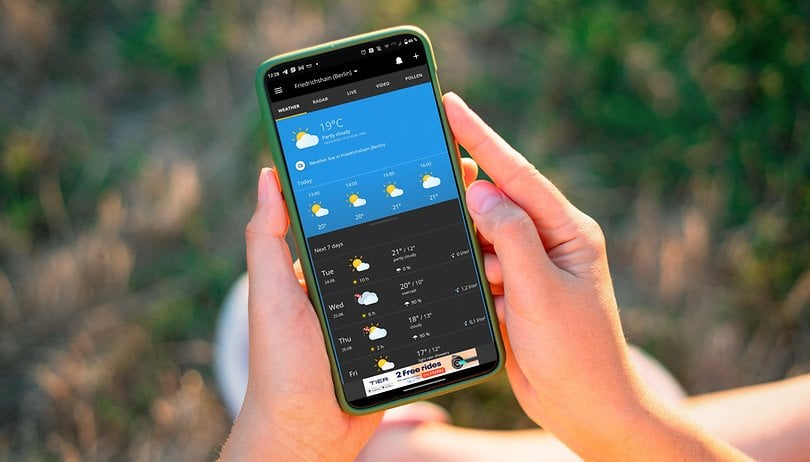

Was ist die beste Wetter-App für Euer Smartphone? In dieser Bestenliste haben wir Euch eine Auswahl für iOS und für Android zusammengestellt. Dabei haben wir auf Faktoren wie die Aktualität der Daten, auf die Optik und auf Sonder-Features wie Regenradar, Widgets und mehr geachtet. Dass die jeweilige Wetter-App Euch immer Sonnenschein garantiert, das können wir allerdings nicht versprechen.
Während man für Wettervorhersagen damals noch den Fernseher pünktlich zur Tagesschau einschalten musste, ist das heutzutage ganz einfach. Denn Euer Smartphone ist dank Wetter-Apps im Grunde genommen die ultimative Wetterstation. Über das Internet greift Ihr so bequem auf aufbereitete Daten von Wetterstationen zu, die sich privat wohl kaum jemand leisten könnte.
Nachfolgend zeigen wir Euch die unserer Meinung nach besten Wetter-Apps für iOS und Android. Dabei haben wir besonders darauf geachtet, wie aktuell die gebotenen Daten sind, wie hübsch und übersichtlich die jeweiligen Informationen angezeigt werden und wie es um Sonder-Features bestellt ist. Denn neben der Temperaturanzeige bieten Wetter-Apps spannende Zusatzfunktionen wie Regenradars oder Informationen zum Pollenflug.
Die besten Wetter-Apps für Android und iOS
AccuWeather
Die Anwendung "AccuWeather" ist mit über 100 Millionen Downloads die beliebteste Wetter-App für Android. Tatsächlich ist sie auch eine der besten Möglichkeiten, auf dem Handy die Wetterlage zu checken. Nach der Freigabe Eures Standorts seht Ihr personalisierte Wetterdaten, die direkt vom Global Forecast System (GFS) stammen. Das Design der App ist zudem echt schick und stellt die vielfältigen Infos gut dar.
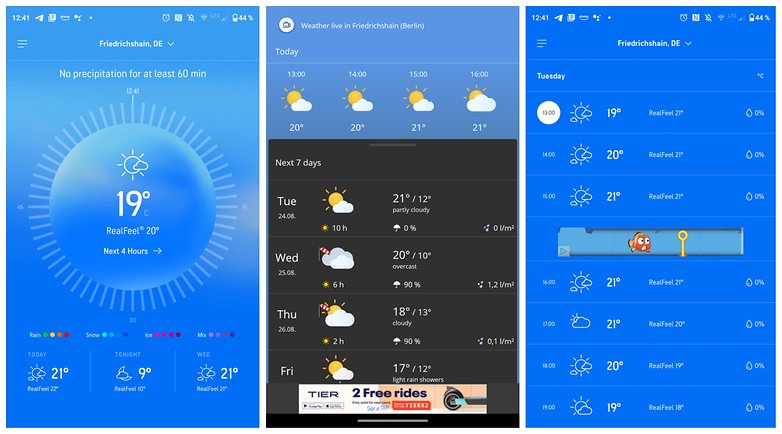
Eine Herausforderung, da AccuWeather echt viele Daten unter einen Hut bekommt. Darunter Informationen zum Wetter, zur Luftqualität, zur Belastung für Allergiker, zur gefühlten Temperatur per "RealFeel", zu Orkanen und ein Regenradar gibt's auch. Ein Widget gibt es auch, bei dem Ihr sogar zwischen einer hellen und einer dunklen Version wählen könnt. AccuWeather ist kostenlos, wenn Euch gelegentliche Werbeeinblendungen nicht stören. Die werbefreie Version kostet 9,49 Euro im Jahr.
Der Google Assistant oder Siri
Die einfachste und zuverlässigste Wetter-App ist auf Eurem Handy bereits vorinstalliert: Der Google Assistant und Siri bieten Euch bequem per Knopfdruck aktuelle Infos zur Wetterlage. Zur Aktivierung müsst Ihr lediglich den Sprachbefehl "Ok Google, wie ist das Wetter?" oder "Hey Siri, wie ist das Wetter heute?" äußern. Schon seht Ihr eine Übersicht über die Wetterlage samt Regenwahrscheinlichkeit und einer Voraussage für die nächsten Stunden. Mit weiteren Befehlen wie "Wie ist das Wetter diese Woche?" oder "Brauche ich heute einen Regenschirm"? könnt Ihr weitere Informationen aus den Assistenten kitzeln.
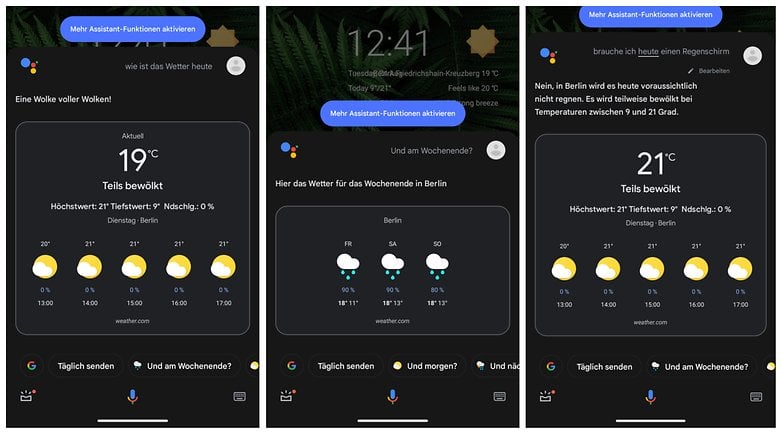
Google bezieht die Informationen direkt vom zuverlässigen Dienst "Weather.com", auf den wir später noch einmal eingehen. Apple bietet nativ eine eigene Wetter-App an, aus der Siri die Infos zieht. Dadurch, dass der Google Assistant und Siri so gut ins Betriebssystem integriert sind, erreicht Ihr die Vorhersagen von überall aus. Lediglich ein Widget fehlt unter Android, seitdem Google seinen Nachrichtendienst "News" und die Wettervorhersage getrennt hat. Sucht Ihr gezielt nach einem Widget, empfehlen wir Euch eine andere App.
WetterOnline
Mit WetterOnline holt Ihr Euch eine Wetter-App, die neben vielen Infos auch einen News-Feed anbietet. Damit eignet sie sich besonders gut für Menschen, die gerne kurze Texte über die Wetterlage genießen wollen. Wie in einem Blog präsentiert WetterOnline dazu Bilder und Links zu weiteren Informationen. Abgesehen von dieser News-Funktion kann sich der Funktionsumfang ebenfalls gut sehen lassen.
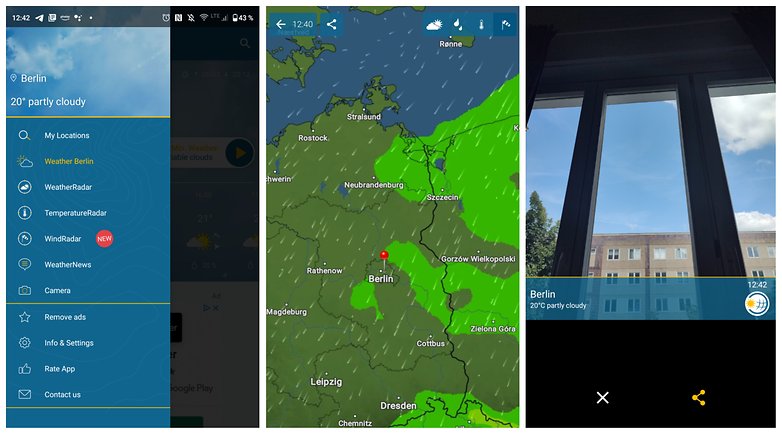
Als Highlight gibt es neben den üblichen Kandidaten wie Wettervorhersagen, einem Regenradar, einem Windradar und einem Temperaturradar auch ein Foto-Feature. Dahinter verbirgt sich die Möglichkeit, kurz ein Bild über die Handykamera aufzunehmen und dieses dann mit eingeblendeten Wetterinformationen an Freunde oder Verwandte zu schicken. Eine coole Idee, wenn Ihr gerne mit dem Wetter am Urlaubsort angebt.
Leider findet sich in WetterOnline recht viel Werbung. Wie bei AccuWeather müsst Ihr ein Abonnement abschließen, für das entweder 0,99 Euro im Monat oder 6,99 Euro im Jahr fällig werden. Jeweils könnt Ihr das Angebot 14 Tage lang umsonst testen.
Wetter.com
Zu guter Letzt noch eine sehr beliebte Wetter-App, die einen cleveren Vorteil gegenüber anderen Anbietern hat: Wetter.com sammelt auch die Live-Feeds von Webcams auf der ganzen Welt. Darüber hinaus erstellt die Redaktion hinter Wetter.com Videos mit Vorhersagen. Wollt Ihr also ein wenig Nachrichtensprecher-Feeling, empfiehlt sich Wetter.com ganz besonders.
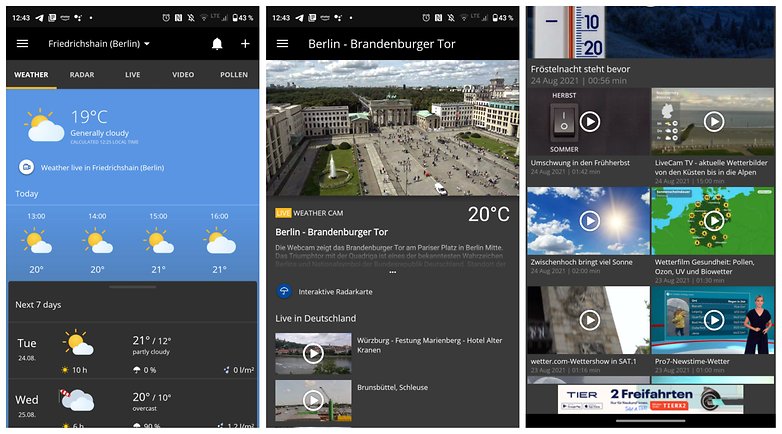
Darüber hinaus kann Wetter.com beim Funktionsumfang mit den weiteren Wetter-Apps mithalten. Es gibt ein Regenradar, Warnungen zur aktuellen Wetterlage und natürlich eine Vorhersage für die nächsten Tage. Doch auch Wetter.com kann es nicht lassen und bietet eine werbefreie Version nur im Abonnement an. Ihr zahlt 4,99 Euro im Jahr oder 99 Cent für einen Monat. Wollt Ihr Euch nicht an ein Abo binden, gibt es das Ganze auch etwas teurer als Tickets ohne automatische Verlängerung.
Geometric Weather für Android
Ein Tipp noch für die Android-Fraktion: Die App "Geometric Weather" zeigt Euch aktuelle Informationen vom Dienst "AccuWeather.com" ganz ohne Werbeeinblendungen. Dabei ist das Design, wie der Name schon verrät, eher abstrakt und orientiert sich an geometrischen Formen. Das Ergebnis ist eine hübsche und leichte Wetter-App, die es aber im Funktionsumfang nicht mit den genannten Alternativen aufnehmen kann.
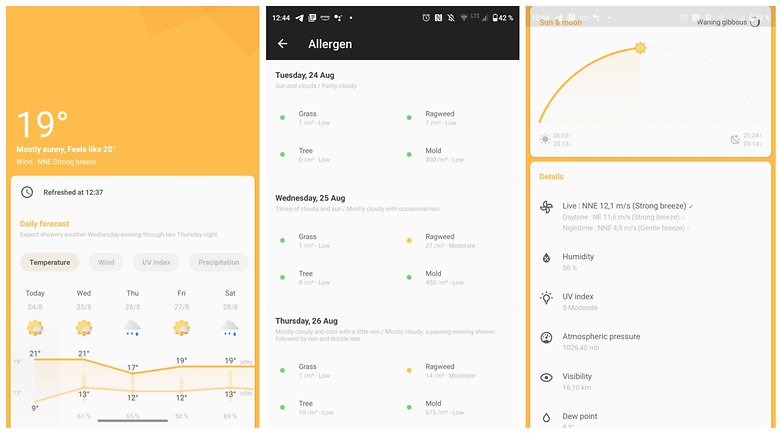
Ein Regenradar fehlt, lediglich Hinweise für Allergiker sind mit an Bord. Im Vordergrund steht also die Werbefreiheit und die minimalistische Optik. Diese führt sich auch in einem hübschen Widget fort, das Ihr in vielen Variablen an Eure Vorlieben anpassen könnt. Kosten kommen bei der Installation von Geometric Weather nicht auf Euch zu, Werbung gibt's wie gesagt auch nicht.
Wie sind Eure Erfahrungen mit den genannten Wetter-Apps und habt Ihr noch einen werbefreien Tipp für Apple iOS? Ich nehme ihn gerne mit in diesen Artikel auf und gehe auf Eure Vorschläge in den Kommentaren ein.





Es fehlt die DWD-App im Test, die allerdings nur in der Vollversion den kompletten Komfort bietet. Für haupt- und ehrenamtliche Mitarbeiter verschiedener Dienste ist die Vollversion sogar kostenlos (was nicht groß geprüft wird). Nachdem der Regenradar von WetterOnline zunehmend unzuverlässig wurde (u. a. keine Aktualisierung initiierbar), bin ich vor ein paar Tagen auf den viel besseren DWD-Regenradar umgestiegen.
DWD-App fehlt in der Auflistung.
Vielleicht nicht am meisten geladen, jedoch (noch) eine der zuverlässigsten!
@engländer
Ich bin ehrenamtlich unterwegs (BRK u. a. wie Malteser & VDK); jedoch sollte man nicht laufend auf die Tatsache der "schwammigen" Prüfung hinweisen!
Nicht ehrenamtlich tätige, können durchaus den geringen Obulus als Einmalkauf entrichten.
DWD ist bei mir die genaueste Wetter-App, wenngleich immer noch relativ unzuverlässig. Liegt anscheinend am Wohnort in Niederbayern, wo (zuverlässige) Wetterstationen in der Nähe quasi nicht existent sind.
DWD WarnWetter app für mich auch die beste. Gerade der Regenradar ist super genau!
Ansonsten kann ich auch Kachelmann empfehlen:
https://kachelmannwetter.com/de
-
Admin
24.08.2021 Link zum KommentarDie zuverlässlichste App ist für mich immer noch die vom DWD
The main-question is: "Woher beziehen die Appanbieter ihre Daten?" Bei diesen vorinstallierten und globalen Wetterapps werden angeblich nicht so viele regionale Datenstationen angesteuert, was zu Lasten der Genauigkeit bzw Treffsicherheit geht. Laut c´t-Redaktion soll da Wetter-Online angeblich die mit Abstand beste Wahl in Mitteleuropa sein. Letztere Feststellung von Georg Schnurer (Heise-Verlag) ist allerdings schon ein paar Jahre alt.
-
Admin
-
Staff
24.08.2021 Link zum KommentarHallo zusammen!
Bei perfektem Sonnenschein habe ich unsere Liste der besten Wetter-App aktualisiert.
Viel Spaß beim Ausprobieren!
Habe mir mal Carrot Weather installiert, weil ich diese App zum einen nicht kannte und zum anderen, weil sie hier im Artikel vorgestellt wurde.
5 Minuten angeschaut und direkt wieder runter geworfen. Das ist echt riesen Müll, den die Welt nicht braucht 😂
Eines der ersten Dinge die vom Handy fliegt, wenn möglich, sind es die Wetterapps. Wenn ich das Wetter wissen will, dann siehe Karstens Posting, meist reicht ein Blick nach draußen. Für eine Vorhersage von 3 Tagen oder mehr schaue ich einfach auf ne Wetterwebseite, wobei ich weiß, dass die Wettervorhersage für die nächsten 3 Tage einen gewissen Wert hat, alles weitere ehr nicht. Wetter-Apps brauche ich daher nicht.
Und letztlich ist jede App sinnlos. Mir ist bisher keine App untergekommen, welche das Wetter auch nur für den heutigen Tag vorhersagen konnte.
Da kann ich helfen: Die Pro-Version vom Windfinder bietet zwei unterschiedliche Vorhersagemodelle, die man vergleichen kann. Je nach Zuverlässigkeit der Rohdaten - nicht jede Witterungslage lässt gleich präzise Prognosen zu - gelingt Windfinder immer wieder, das Wetter des (nicht nur) aktuellen Tages exakt vorherzusagen.
Es gibt aber auch andere Wetterdienste, die das können.
Ich hatte durch Zufall Wetterplaza entdeckt. Diese App enthält eine Übersicht des Wetters, Regenradar, Blitzradar (Gewitteralarm), Sonne etc.
Die einzelnen Punkte gibt es auch als separate Apps oder zusammengefasst als Wetterplaza.
Ich finde die Vorhersagen sehr genau und zuverlässig.
Laut Test und das würde auch bei RTL Punkt 6 heut gezeigt, fällt die Wetter App von Samsung durch.👎
Ich nutze zwei Apps mit drei unterschiedlichen Vorhersagemodellen. Außerdem achte ich darauf, ob sich die Vorhersagen über die Tage in ihrer Tendenz häufig ändern, oder konstant bleiben. Daraus lässt sich eine ganz brauchbare Vorhersage für die nächsten Tage ablesen.
Kachelmann Wetter ist hervorragend.
Und die App vom DWD selbstverständlich. AccuWeather ist einfach nur Müll.
wobei der dwd auch gerne Mal warnt obwohl nix also rein gar nix ist 😂
Der DWD macht ja auch nicht das Wetter, sondern berechnet lediglich Wahrscheinlichkeiten aus den zur Verfügung stehenden, mehr oder minder zuverlässigen Daten 😂
Die Daten vom DWD sind Müll.
Blödsinn.
Nope. Viel zu oft zeigt der DWD Regen bei völlig klarem Himmel. Und wenn es mal wirklich regnet ist es laut DWD trocken.
Nö, stimmt nicht.
Wettervorhersage für heute Nachmittag: Erst Sonne, dann Wolken, dann Regen. Ich bin bei Sonne mit dem Rad an den Strand gefahren, es kamen Wolken auf, ich radelte nach Hause, es gab Regen.
Dank DWD konnte ich so planen, dass ich nicht nass wurde.
q. e. d.