Die besten Reise-Apps für Android


Wer in den Urlaub fährt, sollte auf bestimmte Reise-Apps nicht verzichten. Sie helfen dem Android-Nutzer während der schönsten Zeit des Jahres und geben hilfreiche Tipps. Wer also bald in die Ferien fährt, sollte folgende Reise-Apps für Android dabeihaben.
Springt zum Abschnitt:
- Reisen mit ...
- Wohnungsvermittler
- Flüge, Hotels und Mietwagen
- Reiseführer und Vorortinfos
- Sicherheit, Checkliste, Übersetzer
Die besten Reise-Apps: Reisen mit der Bahn
DB Navigator
Der DB Navigator ist der Allrounder für Bahnfahrer. Ihr könnt Verbindungen suchen und Tickets kaufen. Der Bereich "Meine Reise" zeigt Euch an, wann Ihr umsteigen müsst oder ob Verzögerungen vorliegen. Wer sich die Sparpreise mit Zugbindung kaufen möchte, kann über den Angebotsfinder seine Reise zusammenstellen.
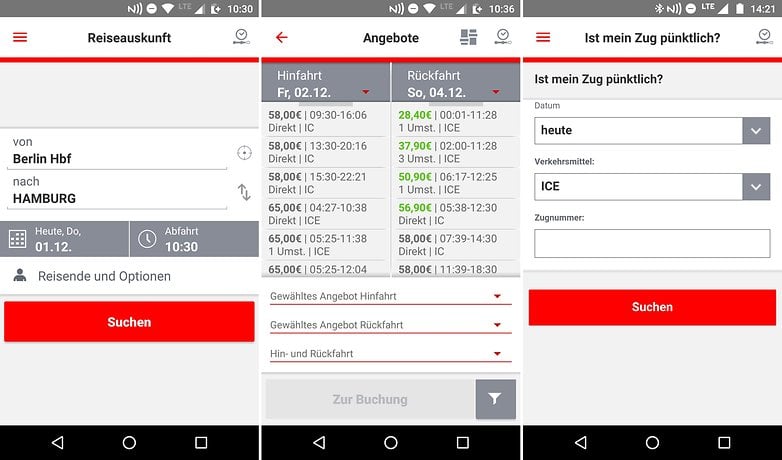
Auch der Sparpreis-Finder kann verwendet werden, um zu oder von einem ausländischen Reiseziel zu kommen. Zwar klappen hier noch nicht alle Verbindungen, aber die Zahl wird in den kommenden Jahren sicherlich steigen.
${app-de.hafas.android.db}Die besten Reise-Apps: Fahren mit dem öffentlichen Nahverkehr (ÖPNV)
Öffi - Fahrplanauskunft
Öffi ist ein alter Bekannter unter den ÖPNV-Apps: Zunächst wählt Ihr Euren Verkehrsverbund aus und dann könnt Ihr Euch die besten Verbindungen in einer grafischen Darstellung ansehen. Ihr könnt natürlich auch Netzpläne abrufen oder Abfahren nahegelegener Haltestellen checken. Natürlich könnt Ihr die Navigation von Tür zu Tür oder Haltestelle zu Haltestelle abfragen.
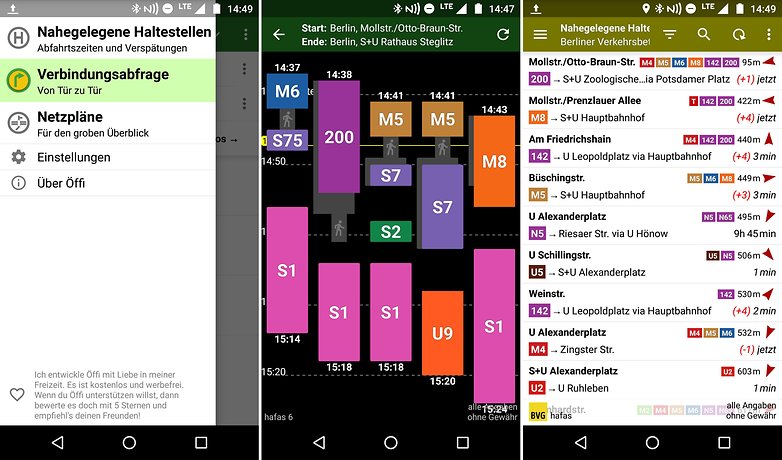
Vielleicht die größte Schwachstelle ist, dass Ihr stets den richtigen Verkehrsverbund auswählen müsst. Das ist im Pendler-Alltag natürlich unerheblich, weil stets Eure Heimatstadt eingestellt ist, bei Ausflügen in andere Städte wird das aber ärgerlich, denn die erste Abfrage klappt wegen der falsch eingestellten Umgebung oft nicht - hier wäre eine Automatik wünschenswert.
${app-de.schildbach.oeffi}Moovit
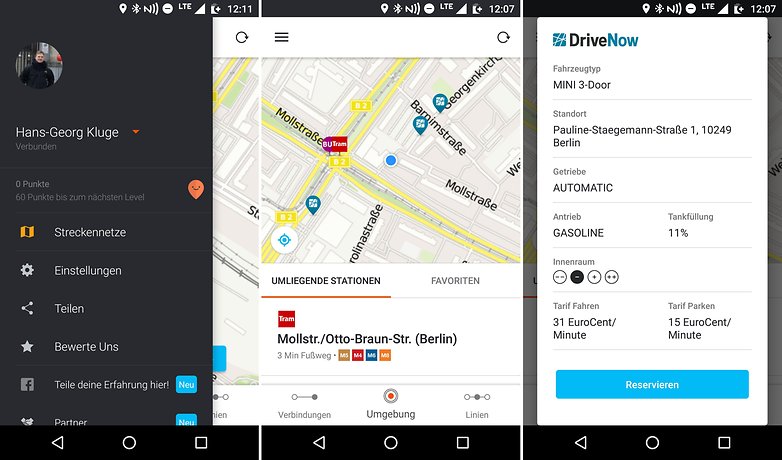
Moovit punktet zunächst mit einem sehr ansprechenden, weil modernen Design. Ihr könnt Euch Verbindungen heraussuchen oder auf der Umgebungskarte nach ÖPNV-Haltestellen suchen. Integriert sind nicht nur öffentliche Verkehrsmittel sondern auch Car-Sharing-Dienste und Fahrradverleihsysteme.
Bei Fahrten mit dem ÖPNV gibt es eine Live-Navigation, die Euch auf Umstiege aufmerksam macht.
Die besten Reise-Apps: Reisen mit dem Bus
Busliniensuche: Fernbus App
Fernbusse sind sehr beliebt. Betreiber wie FlixBus und andere Unternehmen werben mit Dumpingpreisen und Luxus-Features. Da jeder der Anbieter ständig neue Linien hinzufügt, ergeben sich immer neue Möglichkeiten, auch weitere Reisen geschickt mit einer Reise-App zu planen.
Und hier kommt die Reise-App Busliniensuche ins Spiel. Die Android-App ist sehr minimalistisch, denn sie fragt Euch zu Beginn lediglich, wann es von wo nach wo gehen soll. Dank der Daten von über 60 europäischen Fernbus-Unternehmen wird das Busnetz so dicht, dass etwa Reisen von Köln nach London für 33 Euro planbar werden. Bei der Suche des Abfahrtsortes lassen sich bei dieser Reise-App Haltestellen in Eurer Nähe suchen. Alle gesuchten Orte könnt Ihr in eine Liste von Favoriten speichern.
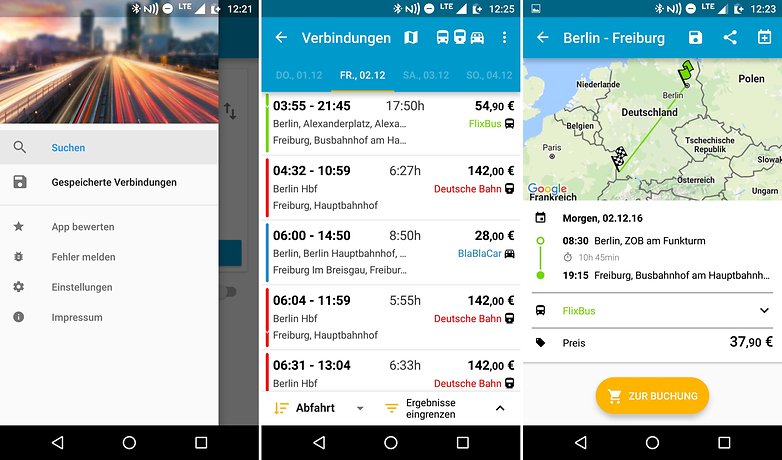
Sobald Ihr die Suche bei dieser Reise-App für Android startet, werden die Ergebnisse aus sämtlichen verfügbaren Datenbanken berücksichtigt und, je nachdem, wie Ihr sortiert habt, kommen immer frühere, schnellere oder günstigere Fahrten an die oberen Positionen. Bahnen und Mitfahrgelegenheiten werden bei der Reise-App übrigens erst eingeblendet, wenn Ihr sie im Filter aktiviert. Gebucht werden die Fahrten aber in der Regel beim jeweiligen Anbieter.
${app-de.raumobil.android.busliniensuche}Die besten Reise-Apps: Reisen in der Fahrgemeinschaft
BlaBlaCar
Viel einfacher und weniger bürokratisch als bei der Bahn geht es in Fahrgemeinschaften zu. Hier setzen sich Fremde zu anderen Fremden ins Auto, beteiligen sich an den Treibstoffkosten und lernen sich auf dem Weg zum gemeinsamen Ziel näher kennen. Ganz vorne auf der Überholspur der Mitfahr-Communitys liegt dabei BlaBlaCar. Laut Betreiber ist die Gemeinde weltweit 65 Millionen Mitglieder stark, von denen pro Quartal 20 Million ihre Fahrt mit der Reise-App BlaBlaCar realisieren. Es ist also sehr wahrscheinlich, dass (zumindest im Umkreis von wenigen Kilometern) jemand Eure Start- und Zielorte ansteuert oder, falls Ihr selbst fahrt und Mitfahrer sucht, die eine Fahrt zu Eurem Ziel suchen.
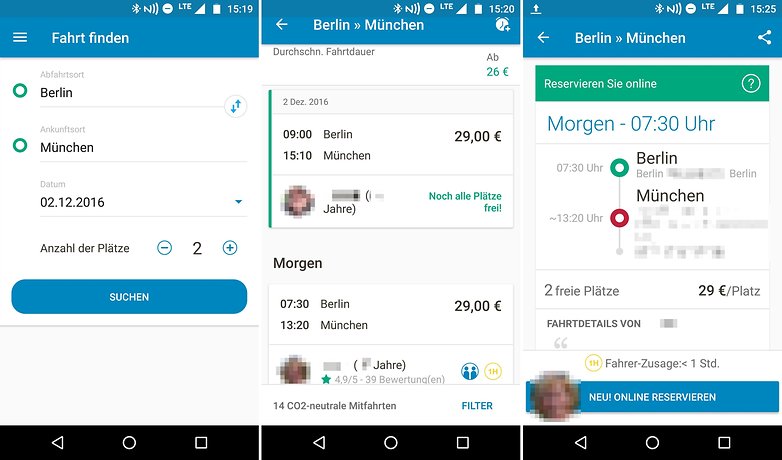
Nach dem Login via Facebook oder E-Mail bestätigt Ihr Eure Handynummer und erstellt ein Profil. Dann könnt Ihr entscheiden wohin geht. Habt Ihr Start, Ziel und Zeit ausgewählt, trudeln die Suchergebnisse bei dieser Reise-App für Android chronologisch geordnet ein. Abfahrtszeiten und Preise lassen sich auf einen bestimmten Rahmen beschränken. Anschließend sucht sich unter den verbleibenden Fahrern den aus, der am ehesten mit Eurem Profil übereinstimmt. Diese könnt Ihr dann unter der einsehbaren Handynummer anrufen oder eine SMS oder eine In-App-Nachricht senden.
${app-com.comuto}Die besten Reise-Apps: Wohnungsvermittler
Airbnb
Wer keine Lust auf ein Hotel hat oder einfach eine günstige Alternative sucht, ist bei der Reise-App von Airbnb bestens aufgehoben. Das Unternehmen vermittelt Unterkünfte von Privatpersonen an Interessenten. Diese Wohnungen, Häuser etc. sind in der Regel deutlich günstiger als klassische Hotels oder Pensionen, außerdem kann es auch viel Spaß machen, in einer gemütlichen Wohnung seinen Urlaub zu verbringen, anstatt in einem sterilen Hotelzimmer.
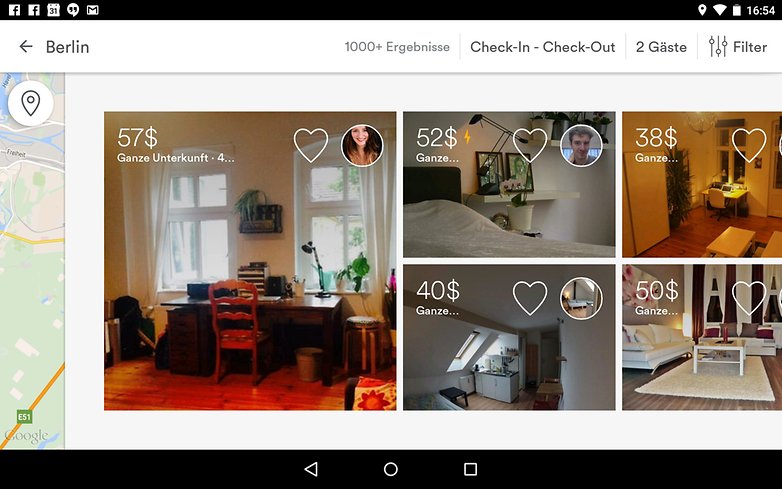
Wer eine Wohnung für seinen Urlaub sucht, wird hier fündig. / © Screenshot: AndroidPIT
Die besten Reise-Apps: Flüge, Hotels und Mietwagen
Swoodoo - billiger fliegen
Schnell einen Flug, das passende Hotelzimmer oder einen Mietwagen buchen. Die passende Reise-App zum Reiseportal Sswoodoo macht es möglich. Was die Urlaubs-App besonders auszeichnet, ist das einfach übersichtliche Design, wodurch Ihr schnell und komfortabel genau das findet, was Ihr wollt.
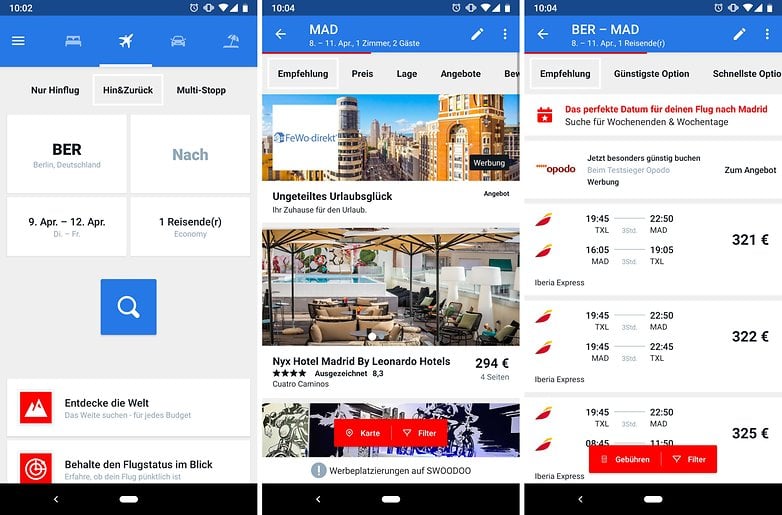
Bei unserem Test ergatterten wir auch einige echte Schnäppchen. Sparfüchsen ist die Reise-App daher durchaus zu empfehlen.
${app-com.kayak.android.swoodoo}Ihr seid deutlich flexibler, wenn es um den Tag für Hin- und Rückflug geht und wollt lieber bares Geld sparen? Dann solltet Ihr einen Blick auf Skycanner werfen. Hier bekommt Ihr auf einer übersichtlichen Kalenderansicht die günstigsten Reisemonate und Daten angezeigt und könnt die günstigsten Angebote raussuchen.
${app-net.skyscanner.android.main}Urlaubspiraten Top Reise Deals
Wer auf der Suche nach einer günstigen Reise zu Top-Zielen ist, wird bei den Urlaubspiraten schnell fündig. Vor allem Kollege Dennis schwört auf die Angebote der Urlaubs-Freibeuter. Mit der Reise-App kann man nun auch unterwegs nach günstigen Angeboten Ausschau halten. Die Urlaubs-App ist dabei ebenso übersichtlich wie die Hauptseite angeordnet, weswegen man oft nur wenige Klicks benötigt, um ein echtes Schnäppchen zu ergattern.
${app-com.tippingcanoe.urlaubspiraten}Die besten Reise-Apps: Reiseführer
Yelp
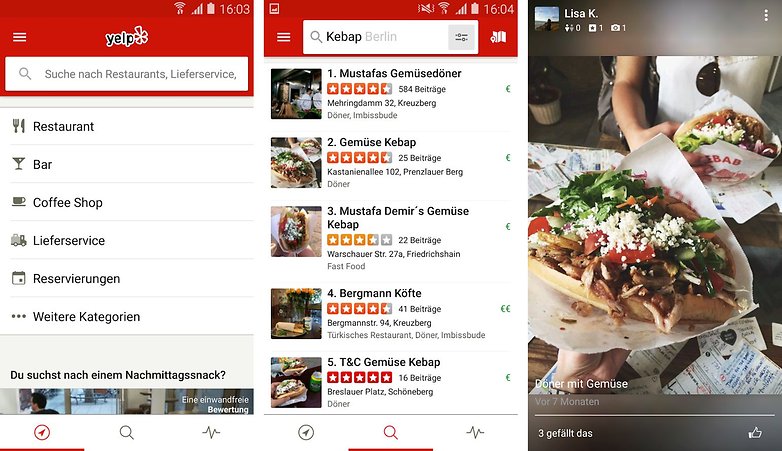
Yelp ist sicher kein Geheimtipp mehr, sondern für viele ein ständiger Begleiter, wenn es um das Suchen und Finden von Restaurants, Bars, Dönerläden oder diversen Geschäften geht. Da Yelp mittlerweile weit verbreitet ist und man selbst in entlegensten Winkeln der Erde Empfehlungen findet, sollten Android-Nuter auch im Urlaub nicht auf die Reise-App Yelp verzichten. Diese App darf folglich nicht in der Liste mit den besten Urlaubs-Apps fehlen.
TripAdvisor: Hotels Restaurants Flüge Aktivitäten
Der TripAdvisor ist ein wahrer Alleskönner, da er eine integrierte Flug- und Hotelsuche inklusive Buchungsfunktion hat und man mit der Urlaubs-App auch Bewertungen zu Restaurants und Hotels abgeben kann. So erfährt der Reisende schon vorab, welche Plätze und Attraktionen man sich unbedingt ansehen sollte und welche nicht.
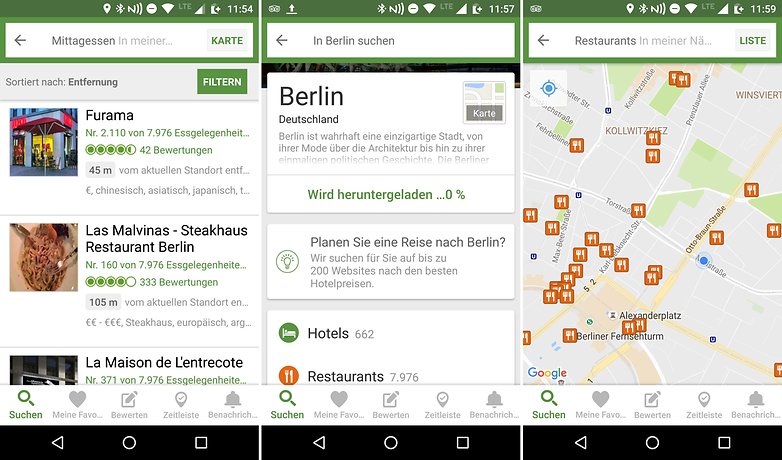
Aber nicht nur unterwegs ist die App richtig praktisch, denn auch Einheimische können von den Restaurant- und Hotel-Bewertungen profitieren. Wollt Ihr wissen, welche Restaurants in der Nähe gutes Essen bieten? TripAdvisor weiß bestimmt eine Antwort.
${app-com.tripadvisor.tripadvisor}World Travel Guide by Triposo
Wer sich die Reise-App World Travel Guide by Triposo zulegt, kann auf dicke Reiseführer oder Karten eigentlich verzichten, denn hier werden Euch zu vielen Reisezielen und Attraktionen alle wichtigen Infos mitgeteilt. Auch zeigt Euch die Urlaubs-App beispielsweise an, welches Wetter zu erwarten ist, ob es interessante Veranstaltungen gibt und welche Hotels noch freie Zimmer haben. Definitiv eine der besten Reise-Apps für Android!
${app-com.triposo.droidguide.world}Die besten Reise-Apps: Sicherheit, Checkliste, Übersetzer, Reiseführer
Sicher reisen
Bevor es mit der Reise losgeht, sollte sich der Urlauber über das Reiseland informieren. Also wie gut die Sicherheitslage ist und ob vielleicht Impfungen nötig sind. Genau diese Informationen liefert die App Sicher reisen des Auswärtigen Amtes. Hier kann sich der Nutzer alle aktuellen Informationen rund um ein Land einholen und so unter anderem erfahren, ob eine Reisewarnung besteht.
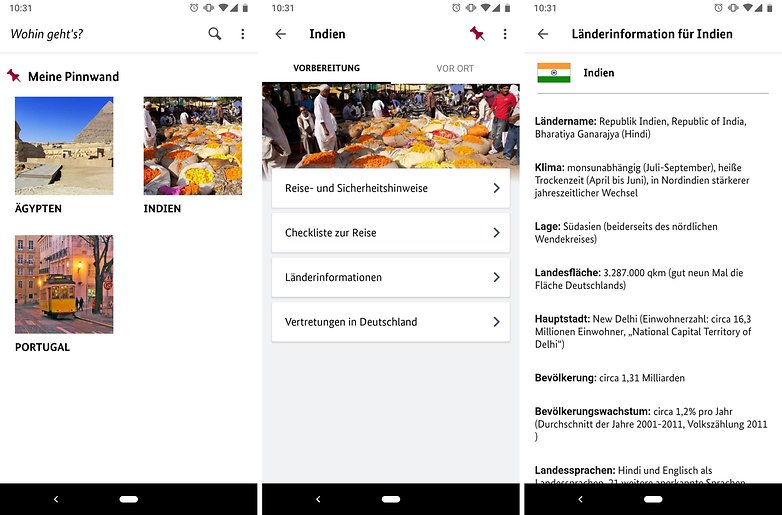
Unter Reisevorbereitungen informiert das Auswärtige Amt außerdem über Rechtsvorschriften des Gastlandes, Zollfragen, den Umgang mit Bank- und Kreditkarten und über viele weitere Gegebenheiten, auf die man achten sollte.
Wenn möglich, sollte der Nutzer die App auch mit in den Urlaub nehmen. Denn wenn sich die Sicherheitslage verändert, steht das ebenfalls in der App. Außerdem zeigt sie an, wo der Nutzer im Notfall eine deutsche Vertretung findet und was zum Beispiel bei Passverlust oder Verkehrsunfällen zu tun ist.
${app-com.aa_app.ui}PackPoint Reisepackliste
Getreu dem Motto “Ich packe meinen Koffer und nehme mit….” zeigt Euch die Urlaub-App PackPoint Reisepackliste genau an, was Ihr für Euren Urlaub mitnehmen solltet. Zu Beginn wählt Ihr, wohin es wann geht, wie lange Ihr dort bleibt und ob es sich um eine private oder geschäftliche Reise handelt. Im nächsten Schritt wählt Ihr, welche Aktivitäten wie Schwimmen, Klettern, Fotografieren etc. Ihr dort vor habt.
Anschließend zeigt Euch die Reise-App an, ob Ihr lange Unterwäsche mitnehmen solltet oder festes Schuhwerk. Die Vorschläge basieren auf der Wettervorhersage für Euren Urlaubsort. Die Reise-App ist nicht nur eine der besten Reise-Apps, sondern hat auch den großen Vorteil, dass der Reisende nichts vergisst und man so nicht haufenweise Checklisten schreiben muss.
${app-com.holiday.checklist}Google Übersetzer: Ideal für Sprachverweigerer
Wer in einem fremden Land unterwegs ist, sollte zumindest ein paar Brocken der Landessprache kennen, um sich ein kühles Bier zu bestellen oder nach dem nächsten Bahnhof zu fragen. Da aber oft mehr verlangt wird, sollten sich Reisende unbedingt die Reise-App Google Translate herunterladen.
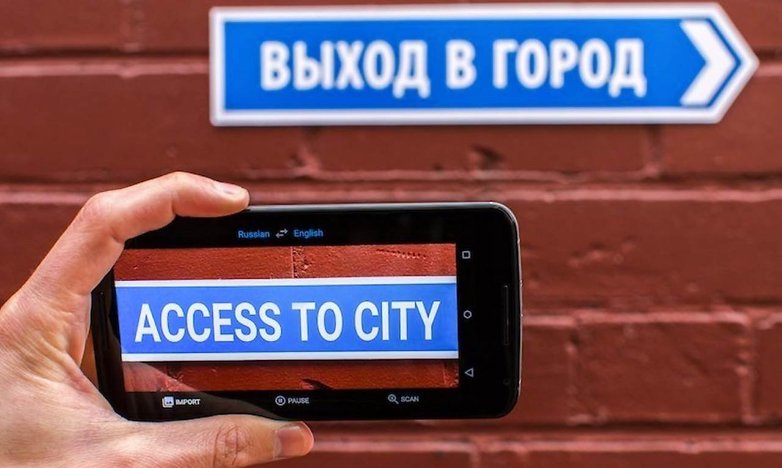
Eine Besonderheit der Reise-App und ohne Frage ein sehr hilfreiches Feature ist die Möglichkeit, mit Hilfe der Kamera einen Text zu übersetzen. Dazu einfach die Kamera auf den gewünschten Satz oder beispielsweise ein Straßenschild halten und schon scannt die Reise-App die Wörter und spuckt eine - in vielen Fällen - richtige Übersetzung heraus. Dieses Feature ist vor allem für Reisen in Ländern eine hilfreiche Unterstützung, bei denen Schriftzeichen oder kyrillische Buchstaben verwendet werden.
${app-com.google.android.apps.translate}Kostenloses WLAN - Instabridge: Ideal für Vielsurfer
Auch im Urlaub will man auf mobiles Internet natürlich nicht verzichten, wer aber Angst vor einer Kostenexplosion hat, greift zur Reise-App Instabridge, die ohne Frage zu den besten Reise-Apps für Android zählt. Sie zeigt Euch eine Liste an öffentlichen WLAN-Netzwerken an, mit denen Ihr Euch verbinden könnt.
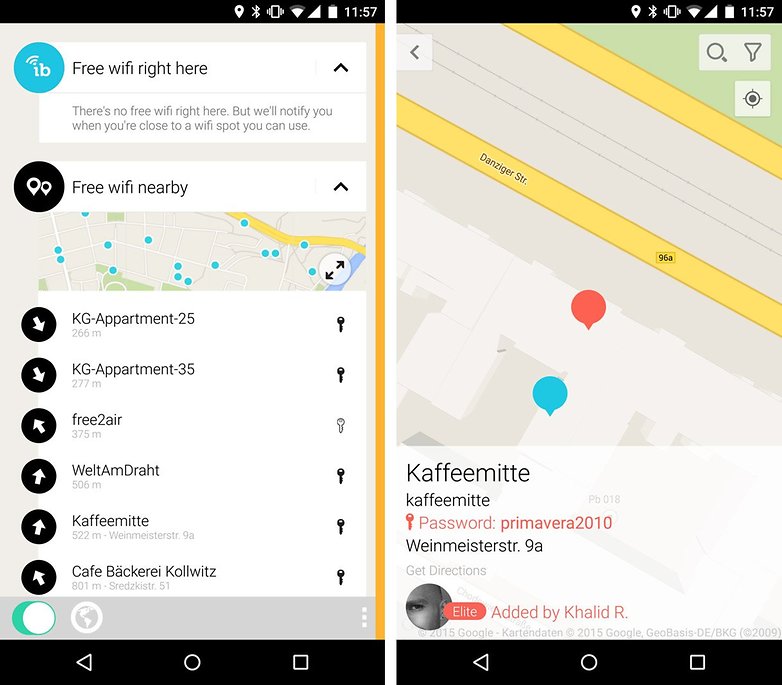
Manche Netzwerke sind verschlüsselt, das Passwort wird Euch aber angezeigt, sobald Ihr auf das Netzwerk klickt. Instabridge ist somit der perfekte Begleiter für all diejenigen, die zum Beispiel Yelp auch im Urlaub nutzen wollen.
Aber natürlich gibt es noch viele weitere Apps, mit der Ihr nach kostenlosen WLANs in Eurer Umgebung suchen könnt. Die Besten davon haben wir hier für Euch zusammengetragen:












Gar nicht schlecht die Übersicht, den Begriff "die besten Reiseapps für Android" halte ich aber für übertrieben und schlichtweg falsch. Auch weil Öffi und co für jeden nützlich sind und viele dieser Apps, wie AirBNB einfahc nur die bekannteste und nicht unbedingt die beste ist. billiger-mietwagen.de fehlt auf jeden Fall auch noch hier drin.
DB Navigator nutze ich sehr oft 👍.
Ich war fast 8 Wochen in Südamerika unterwegs, habe den Hin- u. Rückflug von daheim online gebucht weil der Flug genau 300 Euro günstiger war als mir von diversen Reisebüros angeboten wurde.
Unterwegs habe ich 7 Hotels mit der Booking.com App, 14 Wohnungen mit der Airbn App, mehrere Mietwagen über billiger-Mietwagen.de App, 6 Flüge innerhalb Südamerikas mit Opodo sowie Jetradar Apps gebucht, bei allen Flügen auch online eingecheckt. Alles hat super geklappt, die Hotels waren Top, die Mietwagen waren Top die Wohnungen und auch Vermieter waren in Ordnung
Ich war ehrlich gesagt begeistert, daß das alles mit dem Handy problemlos klappte.
Prepare a Trip ist noch eine Packlisten-App
Ich frage mich mal wieder worin der Vorteil von Airbnb (hier ja empfohlen) und Konsorten liegt. Bei mehreren Vergleichen in mir bekannten Städten, damit ich die Lage der Wohnungen auch beurteilen kann, gab es bei diesen Wohnungsvermittlern nur sehr geringe bis gar keine Preisunterschiede zu Hotels, wobei ich nur Hotels im Bereich der vier und fünf Sterne gewählt habe. Und wenn ich mir dann die Nachteile ansehe, ich muss für mein Frühstück selber sorgen und auch das Bett selber machen oder mal das Bad putzen damit es ordentlich ist, bevorzuge ich das Hotel. Des weiteren sollte man bedenken das ein Hotel gewisse Auflagen (z.B. im Brandschutz oder bei der Trinkwasseruntersuchung) erfüllen muss welche ich bei der vermittelten Wohnung nicht habe - wenn das Haus schön alt ist hat es eventuell noch irgendwo Bleirohre in der Wasserversorgung.
Wenn man natürlich Wert auf einen Pförtner mit Fliege und sonstige Diener legt, sollte man wirklich ins Hotel gehen, frag doch mal einem Vorkoster, nicht daß Du Dir noch den Magen verdirbst.
Übrigens, oftmal gibts in den Wohnungen auf Nachfrage auch ein Frühstück oder sogar Abendessen.
Ich lege Wert darauf ein sauberes Zimmer und Bett zu haben ohne beides selber machen zu müssen. Ich nutze Hotels von einfach bis zu Luxus, immer abhängig von der Lage und dem Preis und bin bisher, auch ohne Bewertungsportalen, nur einmal, in der Zeit vor dem Internet, reingefallen.
Da fehlt definitiv SkyScanner! Die einzige mir bekannte App, die in einem Balkendiagramm erlaubt die günstigen Tage für einen Flug auszusuchen, wenn man zeitlich flexibel ist.
Urlaub buche ich nicht mehr online. Die Zeiten sind schon länger vorbei wo man da billiger war.
Reisebüro ist wieder Inn. Viele Tests haben ergeben dass der billige Urlaubskauf im Netz nur ein Mythos ist. Sogar teuerer oft. Man glaubt ein Schnäppchen zu machen laut Webseite, und in Wahrheit gibts den Urlaub im Büro billiger samt netter Beratung.
Dieße drei großen Namen im TV die im Osten Deutschlands ansässig sind...
Augen auf bei Urlaubskauf
So unterschiedlich ist das. Ich buche eben nicht mehr im Reisebüro, weil man da vielleicht noch eine Tasse Kaffee bekommt, aber das war's dann auch mit Beratung. und was die einem dann zusammenstellen, wenn es mal nicht gerade das Standard- Resort- Strand Pauschalangebot ist, jammert den kleinen Hund.
Klar ist man bei "diesen 3 großen Namen aus dem Osten" in keinster Weise besser dran und auch nicht billiger. Aber es gibt ja Kayak, Tripomatic, Booking.com und viele andere, bei denen man sich seine Reise prima zusammenstellen kann, und zwar mit den lokalen Angeboten am Reiseziel. Und das macht richtig Spaß, zumindest mir.
Wobei man auch die Hotelbuchungssysteme mit Vorsicht genießen sollte. Und da bei HRS und Booking das Kartellamt mittlerweile deren Preisklauseln für unwirksam erklärt hat lohnt sich die direkte Nachfrage im Hotel nochmals.
Im übrigen sind auch die Reisebüros "faul" geworden und nutzen die Hotelbuchungssysteme um dem Kunden bei einer individuellen Reise das Hotel zu buchen - also bekommt man dort auch nicht unbedingt das beste Angebot.
Da gebe ich Dir Recht, der günstigste Flug nach Buenos Aires sollte in 4 angefragten Reisebüros 860 Euro kosten, ich habe online 300 Euro (Dreihundert) weniger bei der gleichen Fluglinie bezahlt.
Und iSayHello Communicator Pro ist die Beste Übersetzer App für den Urlaub und auf Reisen. Mit zwei kleinen Sprachmonstern die gleich simultan übersetzen, und einem integriertem Reisewörterbuch.
Die App von Busliniensuche sieht mittlerweile ein bisschen moderner aus, als auf den Screenshots zu sehen.
Hi Kirill. Wird bald angepasst. Danke für den Hinweis ;)
Sehr hilfreich
Für welches Land empfehlt ihr TripAdvisor? Für Deutschland jedenfalls taugt die App überhaupt nichts. Es fehlen fast alle Bestandteile. Selbst in ausgewiesenen Tourismusgebieten finde ich nur vereinzelte Einträge. Schade, dass euch wohl die Zeit fehlt, die empfohlenen Apps zuvor wenigstens mal oberflächlich zu testen.
Es ist in jedem Fall in GB gut und ausführlich. Kritik von Benutzern wird nicht zensiert oder umsortiert, daher sehr nützlich.
Ich habe bei meinen letzten beiden Urlaubsplanungen mal die Hotelpreise mit denen bei Airbnb und Wimdu verglichen und dabei festgestellt, dass bezüglich meinen Anforderungen z.B. an die Lage, die Hotels nicht oder nur unwesentlich teurer waren. Dazu kommt, dass ich mich im Hotel weder um mein Frühstück noch um die Säuberung des Zimmers kümmern muss. Und davon das ein Gewerbebetrieb diverse Vorschriften (Brandschutz und anderes) erfüllen muss und auch Steuern zahlt (ob das auch alle Privatvermieter so machen) möchte ich erst gar nicht reden.
Und nicht eine App fürs Hostels.... Ei ei ei.
Hostelworld zum Hostels checken und hostelbooker (geringere Gebühren) zum buchen