Top Android-Apps: Must-Have-Apps für jeden Android-Nutzer im Jahr 2024

Ihr sucht nach erstklassigen Android-Apps, die Euer Smartphone-Erlebnis verbessern? Egal, ob Ihr KI-generierte Inhalte, Fotobearbeitungstools, Fitness-Tracker, GPS-Navigation, Wetter-Updates, Musik-Streaming, Wellness-Guides oder Produktivitätssteigerungen sucht, unsere Liste hat alles für Euch parat. Taucht ein in unsere angesammelte 2023 Auswahl der besten Android-Apps, die im Google Play Store erhältlich sind.
Dieser Leitfaden konzentriert sich auf einzigartige und hochwirksame Android-Apps. Beliebte Tools wie Google Maps, Chrome und WhatsApp sind nicht dabei, sodass wir uns auf weniger bekannte, aber ebenso wertvolle Anwendungen konzentriert haben.
Inhaltsverzeichnis
- Die beste KI-Chatbot-App
- Die beste KI-Kunstgenerator-App
- Die beste digitale Entgiftungs-App
- Die beste Foto-App
- Die beste App zur Fotobearbeitung
- Die beste Produktivitäts-App
- Die beste Mail-App
- Die beste Fitness-App
- Die beste App für Notizen
- Die beste Navigations-/GPS-App
- Die beste Wetter-App
- Die beste App zum Abspielen/Audiobooks/Podcasts
- Die beste App für Online-Speicher
- Die beste Dating-App
Die beste KI-Chatbot-App: AI Chatbot Nova
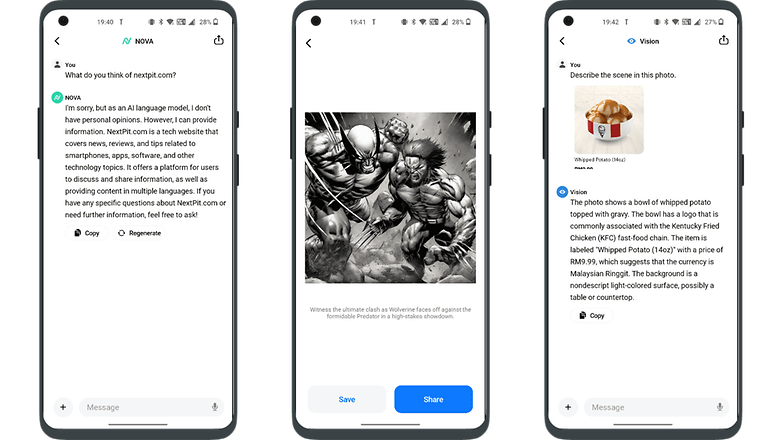
ChatGPT ist bekannt, aber AI Chatbot Nova zeichnet sich durch seine Genauigkeit aus. Die Basisversion von Nova mit drei täglichen Chats ist kostenlos, aber es gibt ein wöchentliches Abonnement für 1,19 Euro oder ein Jahresabonnement für 64,99 Euro, das unbegrenzte Nutzung, detaillierte Antworten, einen Chatverlauf, sofortige Antworten, OCR und einen Bildgenerator bietet. Es ist ideal für alle, die stark auf Chatbots angewiesen sind und lässt sich durch Funktionen wie Sprachbefehle gut in das smarte Home integrieren.
- Preis: Kostenlos / Werbung: Keine / In-App-Käufe: Ja / Konto: Nicht erforderlich
AI Chatbot Nova aus dem Google Play Store herunterladen
Die beste AI Chatbot App Alternative: ChatOn
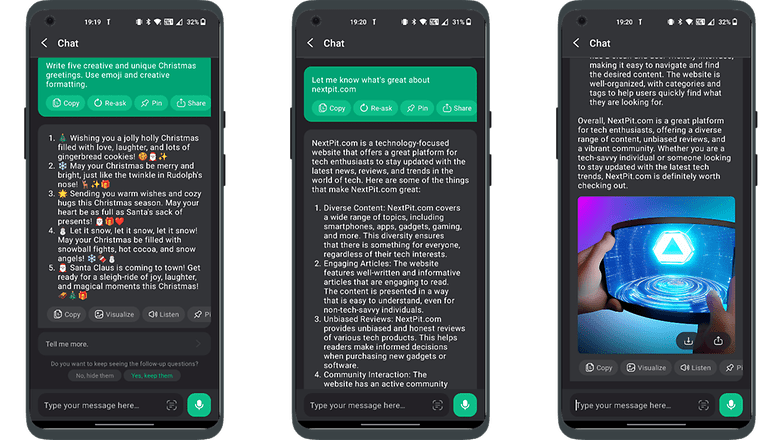
ChatOn zeichnet sich durch seine Fähigkeit aus, Informationen aus verschiedenen Inhalten wie Liedern und Blogs zu beziehen und menschenähnliche Antworten zu geben. Zu seinen Stärken gehören Texterkennung, Voice-to-Text, Text-to-Voice und mehrsprachige Unterstützung.
Die Basisversion ist kostenlos, aber ein wöchentliches Abonnement für 6,99 Euro oder ein Jahresabonnement für 64,99 Euro schaltet alle Funktionen frei. Es bietet außerdem einzigartige Interaktionen in Form von Rollenspielen und kann Bilder seiner Antworten visualisieren, was möglicherweise auf eine zukünftige Integration von physischen Robotern hindeutet.
- Preis: Kostenlos / Werbung: Keine / In-App-Käufe: Ja / Konto: Nicht erforderlich
ChatOn aus dem Google Play Store herunterladen
Die beste KI-Kunstgenerator-App: YouCam Perfect
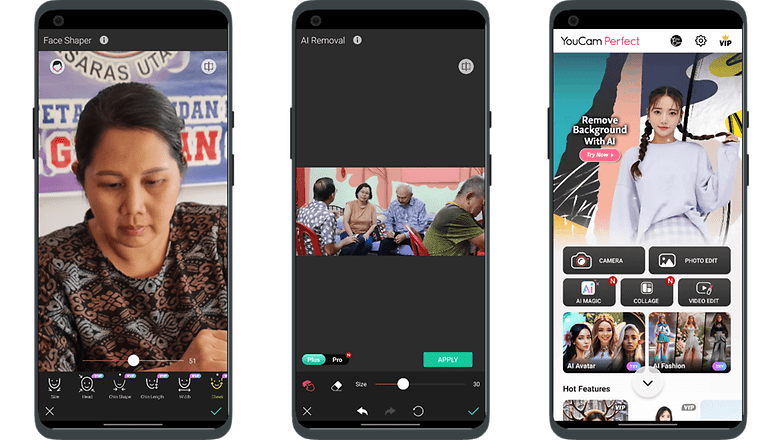
YouCam Perfect ist eine KI-gesteuerte App, die Fotos ganz einfach in Kunstwerke verwandelt – ideal für alle, die keine Erfahrung mit Fotobearbeitung haben. Die App ist benutzerfreundlich, da sie ohne komplizierte Eingabeaufforderungen auskommt, obwohl sie Werbung enthält, die mit einem Abonnement entfernt werden kann.
Sie eignet sich hervorragend für Social Media-Nutzer:innen und bietet Funktionen wie das Karikieren von Selfies, das Aufhellen der Zähne, das Aufhellen der Augen und digitale Retuschen. Weitere Tools sind Sticker, Animationen, Schriftarten, Filter und Hintergründe für personalisierte, beeindruckende Bilder.
- Preis: Kostenlos / Werbung: Ja / In-App-Käufe: Ja / Konto: Erforderlich
YouCam Perfect aus dem Google Play Store herunterladen
Die beste KI-Kunstgenerator-App-Alternative: WOMBO Dream
Der Aufstieg von KI-Kunstgeneratoren wie WOMBO Dream, die für ihre schnelle und effiziente Verarbeitung von Vorgaben bekannt sind, bedeutet nicht das Ende der traditionellen Künstlerkarriere. Diese Tools, die für ihre Vielseitigkeit und ihre benutzerfreundlichen Funktionen bekannt sind, ergänzen die menschliche Kreativität, anstatt sie zu ersetzen.
Sie bieten zwar bequeme Optionen wie die gleichzeitige Erstellung mehrerer Bilder und die Bearbeitung von Text, aber der einzigartige Wert und Ausdruck handgemalter Kunstwerke bleibt unersetzlich. KI-Kunst erweitert den Horizont der Kreativität und ergänzt die traditionellen Kunstformen, anstatt sie zu ersetzen.
- Preis: Kostenlos / Werbung: Keine / In-App-Käufe: Ja / Konto: Erforderlich
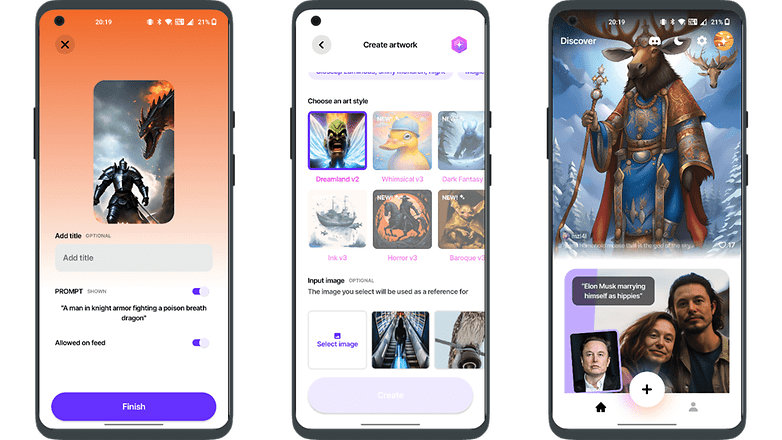
WOMBO Dreams aus dem Google Play Store herunterladen
Die beste digitale Detox-App: Forest: Focus for Productivity
Forest: Focus for Productivity ist eine Achtsamkeits-App, die mithilfe von Gamification die Ablenkung durch das Telefon reduziert. Sie verfügt über einen einzigartigen Fokus-Timer, bei dem ein Samenkorn zu einem Baum heranwächst, während Ihr arbeitet, um ein besseres Zeitmanagement zu fördern.
Wenn Ihr Euer Handy jedoch zu früh benutzt, verdorrt der Baum. Die App lässt sich individuell anpassen, z. B. indem Ihr verschiedene Bäume für Aufgaben einstellt und motivierende Zitate hinzufügt, sodass Ihr Euch besser konzentrieren und produktive Gewohnheiten entwickeln lönnt.
- Preis: Kostenlos / Werbung: Ja / In-App-Käufe: Ja / Konto: Ja
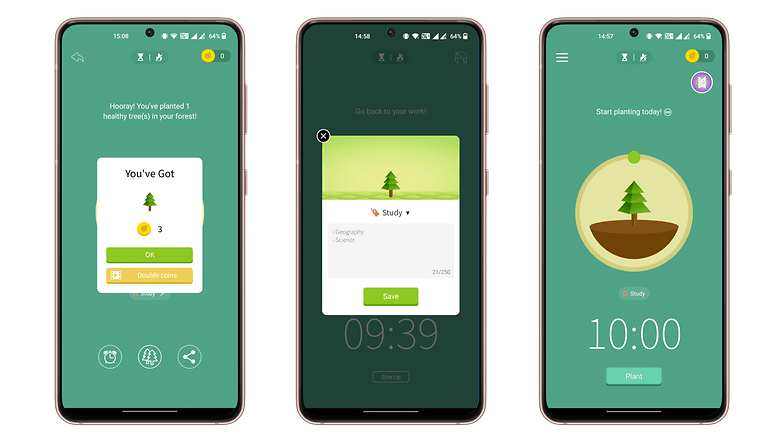
Forest herunterladen: Focus for Productivity aus dem Google Play Store
Die beste Alternative zur Digital Detox App: StayFree - Bildschirmzeit
StayFree hilft Euch dabei, Eure tägliche Bildschirmzeit und die Zeit, die Ihr mit einzelnen Apps verbringt, zu verfolgen und fördert den digitalen Entzug, indem es Grenzen für die App-Nutzung setzt. Die App benötigt Zugriff auf die Nutzungsdaten Eures Smartphones und kann sich mit anderen Geräten synchronisieren, um die Bildschirmzeit zu optimieren und so digitale Ablenkungen zu reduzieren und bessere Gewohnheiten zu fördern.
- Preis: Kostenlos / Werbung: Keine / In-App-Käufe: Keine / Konto: Nicht erforderlich
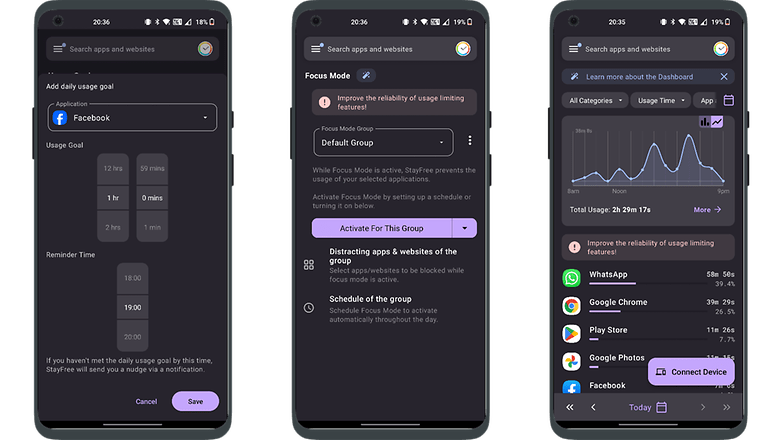
StayFree - Screen Time aus dem Google Play Store herunterladen
Die beste Foto-App: ProCam X
ProCam X ist eine vielseitige Kamera-App, die erweiterte Einstellungen wie ISO, Belichtung und Weißabgleichskorrekturen bietet – ähnlich wie bei einer professionellen DSLR, aber in einem digitalen Format.
Sie ermöglicht die Anwendung von Filtern in Echtzeit, zeigt das Raster des Goldenen Schnitts für den Bildausschnitt an und bietet verschiedene Aufnahmemodi wie Serienbild und automatische Wiederholung. Die übersichtliche Benutzeroberfläche bietet schnellen Zugriff auf gängige Funktionen und ist damit eine gute Alternative zu den üblichen Handykamera-Apps.
- Preis: 5 € / Werbung: Nein / In-App-Käufe: Nein / Konto: Nicht erforderlich.
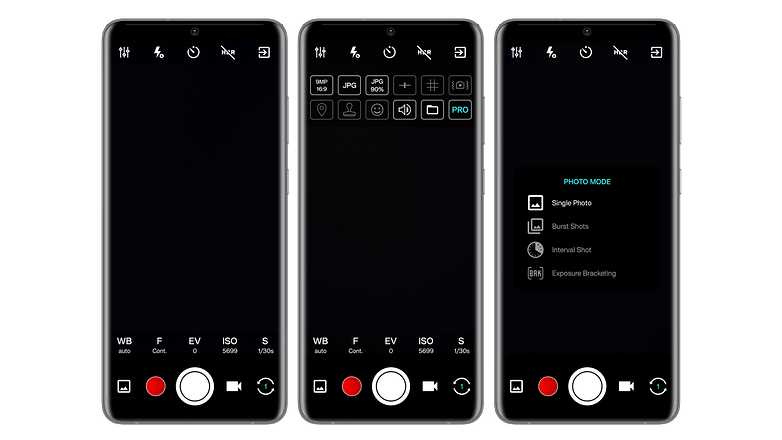
Ladet ProCam X (HD Camera Pro) aus dem Google Play Store herunter.
Die Alternative zur besten Foto-App: Pixtica
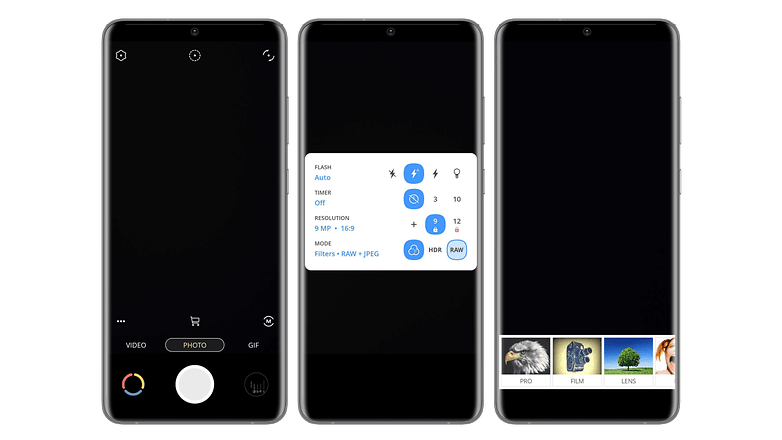
Pixtica ist so etwas wie das Schweizer Taschenmesser unter den Foto-Apps, da Ihr damit nicht nur Fotos und Videos aufnehmen, sondern sie auch nach Belieben bearbeiten könnt. Ihre große Stärke ist ihre Benutzerfreundlichkeit, die durch zahlreiche Werkzeuge und Filter ergänzt wird. Sie kann RAW-Fotos aufnehmen und verfügt über einen HDR-Modus. Ihr findet in der umfangreichen App auch grundlegende Funktionen wie den Timer, die Verwaltung des Blitzes oder die Auflösung.
Pixtica ermöglicht es Euch auch weitere Einstellungen wie ISO, Weißabgleich oder Belichtung zu verwalten. Die Fotoapp hat auch spezielle Funktionen wie das Erstellen eines Panoramas aus einer Reihe von Fotos, das Ändern des Hintergrunds oder das Erstellen von animierten Gifs. Die Benutzeroberfläche ist übersichtlich und gut organisiert, was die Arbeit für Anfänger sehr erleichtert.
- Preis: Kostenlos / Werbung: Nein / In-App-Käufe: Ja / Konto: Nicht erforderlich.
Ladet Pixtica aus dem Google Play Store herunter.
-
Weiterlesen: Die besten Kamera-Apps für Android
Die beste Fotobearbeitungs-App: Snapseed
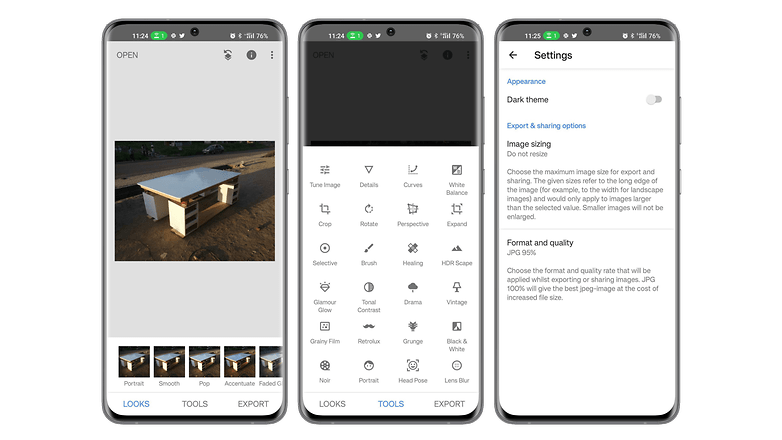
Snapseed ist auch nach einem Jahr noch eine der besten Fotobearbeitungs-Apps und bietet 29 Werkzeuge und Filter für individuelle Bearbeitungen wie Helligkeit, Sättigung, Schärfe und Kontrast, sowohl automatisch als auch manuell. Die App ermöglicht das Drehen, Zuschneiden und Begradigen und unterstützt die Formate PNG, JPEG und RAW. Zu den wichtigsten Funktionen gehören das Entfernen von Objekten, das Zusammenfügen von Fotos und eine benutzerfreundliche Oberfläche.
- Preis: Kostenlos / Werbung: Nein / In-App-Käufe: Nein / Konto: Nicht erforderlich.
Snapseed aus dem Google Play Store herunterladen
Die Alternative zur besten Fotobearbeitungs-App: Toolwiz Photos
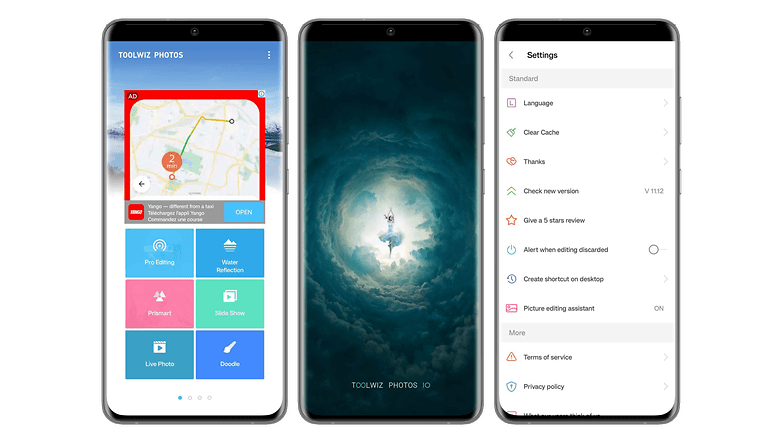
Toolwiz Photos ist auch eine ziemlich gute Fotobearbeitungs-App. Die App bietet nicht nur alle grundlegenden Funktionen und Werkzeuge, um Eure Fotos zu bearbeiten, sondern auch die Möglichkeit, Fotocollagen, Alben oder Präsentationen zu erstellen. Toolwiz zeichnet sich durch eine große Auswahl an Filtern und künstlerischen Effekten wie Pochieren, Gravieren oder Wandmalerei aus.
Die App bietet Schönheitsfilter, mit denen Ihr Euer Gesicht oder Euren Körper schlanker machen, ein Make-up auftragen oder rote Augen entfernen könnt. Ihr findet auch WTF-Funktionen wie das Schätzen des Alters. Nur die überladene und etwas gewöhnungsbedürftige Benutzeroberfläche kann ein wenig stören, aber man gewöhnt sich schnell daran.
- Preis: Kostenlos / Werbung: Ja / In-App-Käufe: Ja / Konto: Nicht erforderlich.
Toolwiz aus dem Google Play Store herunterladen.
- Weiterlesen: Die besten Apps zur Bildbearbeitung für Android
Die beste Produktivitäts-App: Stay Focused
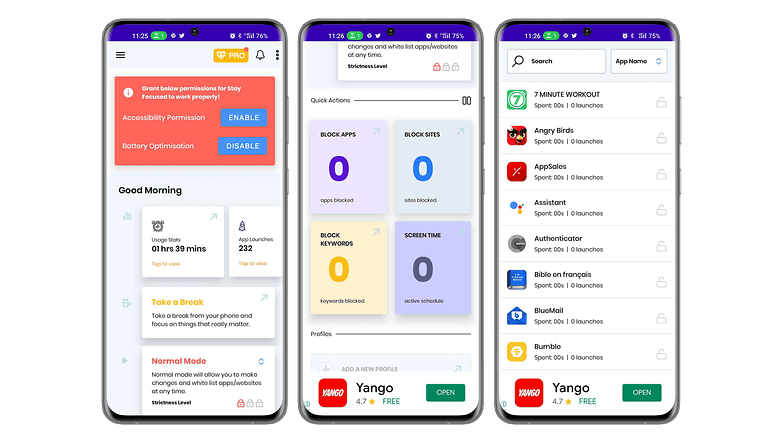
Stay Focused ist eine App, die Eure Produktivität steigert, indem sie Eure Konzentration erhöht. Sie ermöglicht es, Euch von der digitalen Welt abzuschotten, ohne Euer Smartphone auszuschalten. Mit der App könnt Ihr auswählen, welche Webseiten oder Apps Ihr blockieren möchtet und wie lange das dauern soll.
Ihr könnt auch die gesamte Nutzung Eures Smartphones blockieren, um Euch noch besser zu konzentrieren. Stay Focused ermöglicht es Euch, Eure Nutzung zu verfolgen, um Anpassungen vorzunehmen und ein ausgeglicheneres Leben zu führen. Die Benutzeroberfläche ist schlicht und anpassbar, einschließlich eines Dark Mode.
- Preis: Kostenlos / Werbung: Nein / In-App-Käufe: Ja / Konto: Nicht erforderlich.
Stay Focused aus dem Google Play Store herunterladen.
Die Alternative zur besten Produktivitäts-App: Toggl
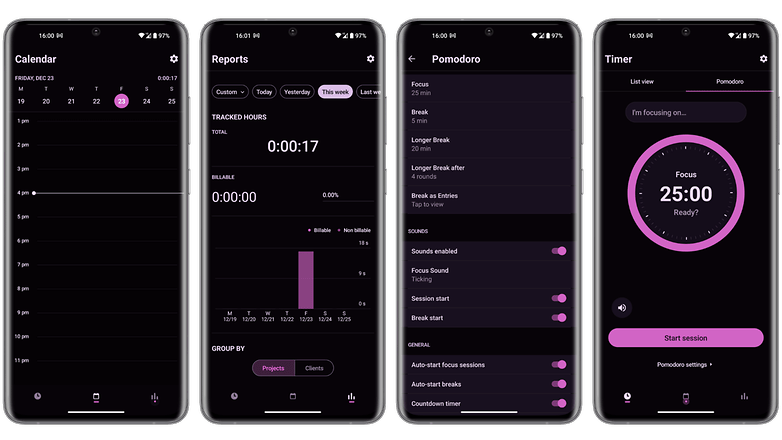
Toggl ist eine Produktivitäts-App, die Euch hilft, Eure Zeit besser zu nutzen. Die App überwacht Eure Zeit mit verschiedenen Tools, wie z. B. einem Pomodoro-Timer, der Hintergrundverfolgung der Zeit die Ihr auf einer Website verbringt, oder dem Import von Daten aus Eurem Kalender.
Toggle hat eine Erweiterung für Chrome und Firefox, aber auch für verschiedene Apps wie Gmail, Asana, Google Kalender, Todoist, Evernote, Trello oder Slack. Die Zeiterfassung kann je nach Euren Vorlieben automatisch oder manuell erfolgen. Die kostenlose Version bietet die meisten grundlegenden Funktionen, und die App hat eine optisch sehr ansprechende Oberfläche.
- Preis: Kostenlos / Werbung: Nein / In-App-Käufe: Ja / Konto: Erforderlich.
Ladet Toggl Track hier aus dem Google Play Store herunter.
Die beste E-Mail-App: Blue Mail
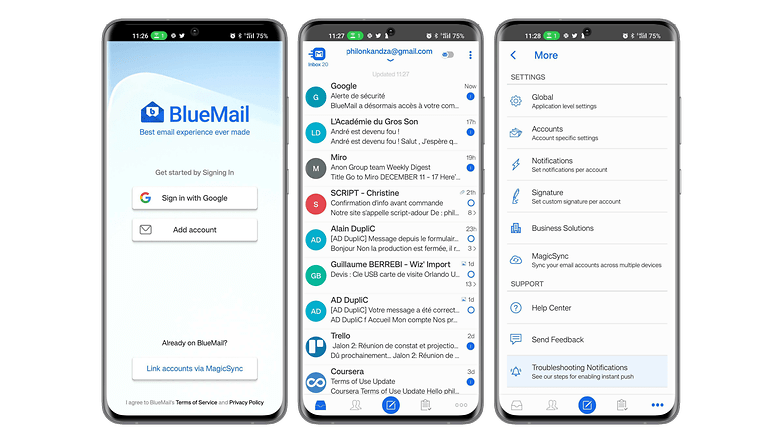
Blue Mail ist eine universelle Mail-App, die für ihre Benutzerfreundlichkeit und ihre schlanke Benutzeroberfläche viel Lob erhalten hat. Sie unterstützt mehrere E-Mail-Dienste, darunter Gmail, Outlook, Hotmail, Yahoo Mail, AOL, iCloud und Office 365 und zeigt alle Eure E-Mails in einem einzigen integrierten Posteingang an.
Blue Mail hat auch einen eigenen integrierten Kalender, der mit den Daten all Eurer E-Mail-Konten synchronisiert wird, sodass Ihr direkt in der App auf Eure Kalenderereignisse zugreifen könnt.
- Preis: Kostenlos / Werbung: Nein / In-App-Käufe: Ja / Konto: Erforderlich.
Ladet Blue Mail hier aus dem Google Play Store herunter.
Die beste Mail-App-Alternative: Cleanfox
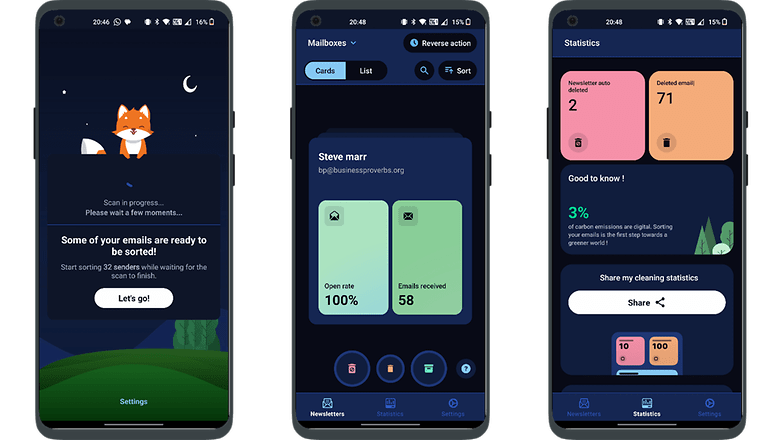
Spike vereinfacht die E-Mail-Verwaltung, besonders für Vielnutzer, indem es die Stile von E-Mail und Instant Messaging zusammenführt. Nachdem Ihr Euch mit Euren bestehenden E-Mail-Konto eingeloggt habt, organisiert es E-Mails in einzelnen Konversationen pro Empfänger und ersetzt die Kopfzeilen, um die Nachverfolgung zu erleichtern. Eine Antwortzeile unter jedem Thread erleichtert die kontinuierliche Kommunikation und macht das Abrufen von E-Mails mit seiner intuitiven Benutzeroberfläche noch angenehmer.
- Preis: Kostenlos / Werbung: Keine / In-App-Käufe: Keine / Konto: Erforderlich
Cleanfox aus dem Google Play Store herunterladen
Die beste Fitness-App: 7 Minutes Workout
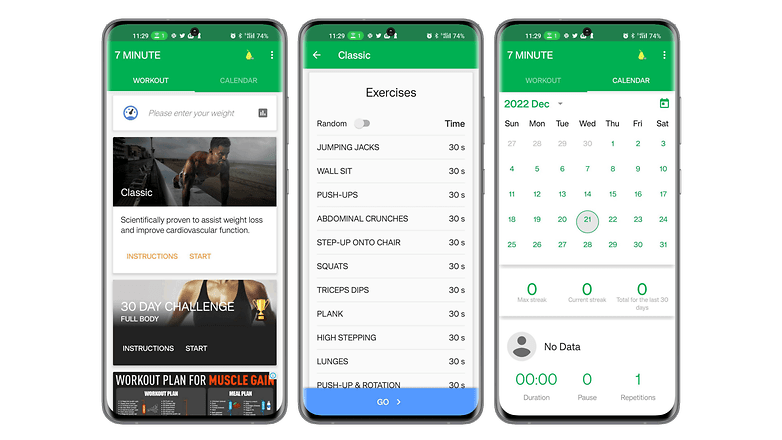
7 Minutes Workout ist eine Fitness-App für alle, die ohne großen Aufwand trainieren wollen. Sie bietet eine Reihe von schnellen Übungen, für die Ihr keine Ausrüstung braucht. Die App basiert auf dem Prinzip High-Intensity Interval Training (HIIT). In der App findet Ihr zwölf Fitnessübungen, die jeweils 30 Sekunden dauern und zwischen denen Ihr Euch zehn Sekunden lang erholen könnt.
Mit nur einem Stuhl, einer Wand und etwas Motivation könnt Ihr Euch in Form bringen oder mit dem Fitnesstraining beginnen, auch wenn Ihr nicht viel Zeit habt. Die Benutzeroberfläche ist benutzerfreundlich und dynamisch, so dass Ihr mit einem Knopfdruck auf dem Hauptbildschirm direkt mit dem Training beginnen könnt.
- Preis: Kostenlos / Werbung: Ja / In-App-Käufe: Ja / Konto: Nicht erforderlich.
Ladet 7 Minutes Workout aus dem Google Play Store herunter.
Die Alternative zur besten Fitness-App: FizzUp
FizzUp ist eigentlich ein Sport-Coaching-Service, der mehrere Trainingsprogramme für verschiedene Ziele anbietet. Wollt Ihr Muskeln aufbauen, abnehmen oder einfach nur in Form bleiben? Die App bietet über 300 Video-Übungen, für die Ihr keine Ausrüstung benötigt, 250 gesunde Rezepte und Bewertungen, um Euren Fortschritt zu überprüfen.
Die App ermöglicht es Euch, ein Sportprogramm zu absolvieren, das auf Eure Fähigkeiten und Ziele abgestimmt ist. Die Trainingseinheiten dauern im Durchschnitt etwa 20 Minuten. Es gibt 15 Level, die jeweils 6 bis 21 Trainingseinheiten umfassen. FizzUp bietet auch Yoga- und Meditationsübungen an. Die Benutzeroberfläche ist angenehm zu bedienen, bis auf die regelmäßige Aufforderung, sich für das Premium-Paket anzumelden.
- Preis: Kostenlos (19,99€/Monat) / Werbung: Nein / In-App-Käufe: Ja / Konto: Erforderlich
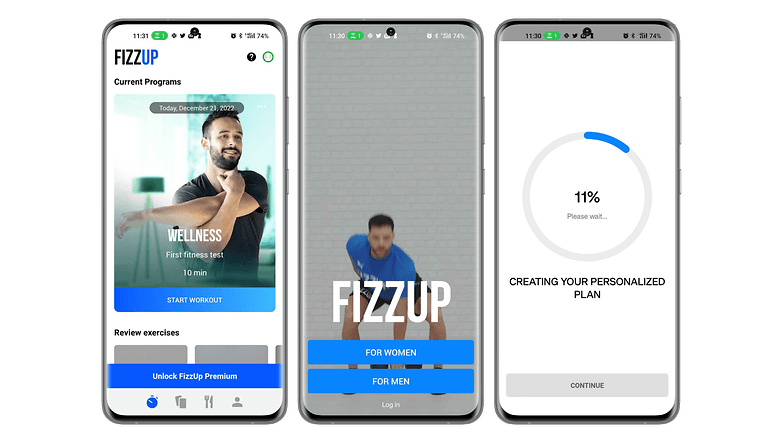
Ladet FizzUp jetzt aus dem Google Play Store herunter.
- Weiterlesen: Die besten Fitness-Apps für Android
Die beste App für Notizen: Joplin
Joplin gilt als eine der umfassendsten Notiz-Apps für Android. In diesem Open-Source-Tool können Eure Notizen direkt in der App durchsucht, kopiert, bearbeitet und beschriftet werden. Wenn Ihr Euer Smartphone nicht dabei habt, könnt Ihr sogar den Texteditor auf Eurem PC benutzen. Die App hat den Vorteil, dass sie das MarkDown-Format unterstützt, das leichtes Markup erleichtert und eine Syntax bietet, die leicht zu lesen und zu schreiben ist.
Neben dem Erstellen von Notizen könnt Ihr mit Joplin auch Aufgabenlisten erstellen, die über mehrere Geräte hinweg synchronisiert werden. Diese Synchronisierung wird durch eine End-to-End-Verschlüsselung geschützt. Die App ist mit Plug-ins erweiterbar, die das Erlebnis noch besser machen.
- Preis: Kostenlos / Werbung: Nein / In-App-Käufe: Nein / Konto: Nicht erforderlich.
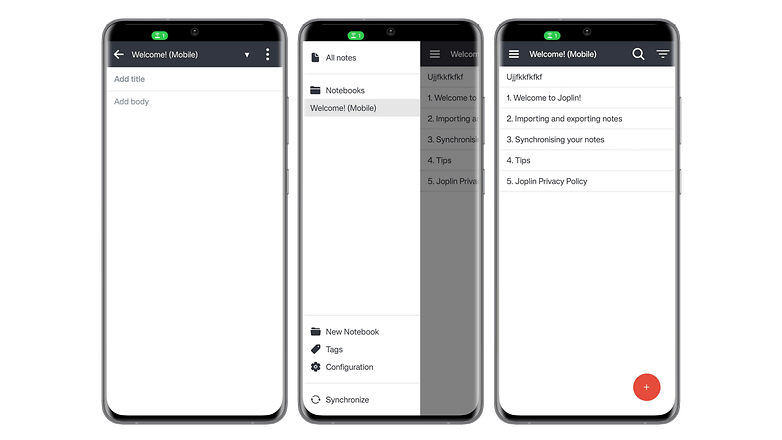
Ladet Joplin aus dem Google Play Store herunter.
Die Alternative zur besten Notiz-App: Google Keep.
Keine Sorge, wir haben die Regeln nicht gebrochen. Keep ist zwar eine App von Google, aber sie ist sehr unbekannt und auf unseren Smartphones praktisch nicht standardmäßig installiert. Keep ist eine App für Leute, die sich nicht gerne den Kopf zerbrechen und das tun wollen, wofür sie gedacht ist: schnelle Notizen machen. Es ist praktisch unmöglich, den Text zu formatieren.
Google Keep bietet jedoch die Möglichkeit, Zeichnungen und Bilder hinzuzufügen und verfügt sogar über eine Audio-Texteingabefunktion, die den Google Assistant nutzt. Die App hat auch eine Suchmaschine integriert und bietet die Möglichkeit, einmalige oder regelmäßige Erinnerungen zu erstellen, die auf einer Uhrzeit oder einer Adresse basieren. Keep überzeugt auch durch seine Synchronisation, seine kollaborativen Möglichkeiten und die Integration in das Google-Ökosystem. Die Benutzeroberfläche ist sehr minimalistisch.
- Preis: Kostenlos / Werbung: Nein / In-App-Käufe: Nein / Konto: Nicht erforderlich.
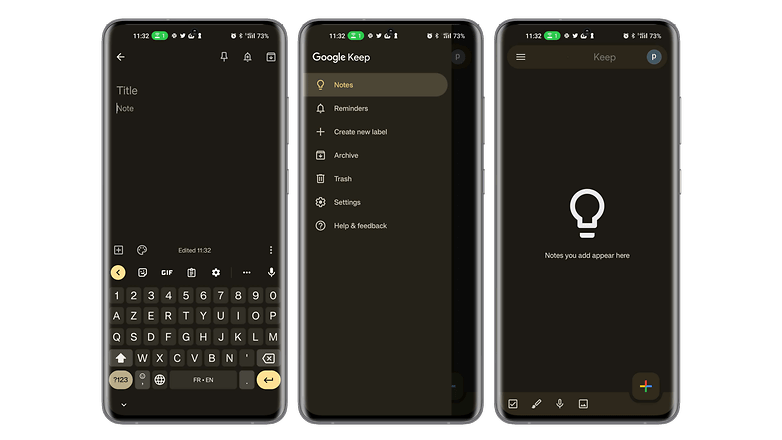
Ladet Google Keep hier aus dem Google Play Store herunter.
Die beste Navigations-/GPS-App: Sygic
Sygic GPS Navigation & Maps ist eine ziemlich beliebte GPS-App, die die beste Alternative zu Waze sein soll. Sie bietet die Möglichkeit, Karten herunterzuladen, um sie offline zu betrachten. Die App verwendet Karten von TomTom und bietet kostenlose Updates für Karten und Points of Interest. Mit seinem "Realview"-System zeigt Sygic Bilder der Straße auf der Ihr gerade fahrt, mit Erkennung von geschwindigkeitsbegrenzenden Schildern.
Die Suche nach einer Route ist schnell und intuitiv. Es ist möglich, den Standort Eures geparkten Autos zu speichern, eine Historie der besuchten Orte und es gibt einen SOS-Modus der Euch hilft die nächstgelegenen Notdienste zu finden und zu kontaktieren. Die App hat eine klare und gelungene Benutzeroberfläche, die präzise und klare 2D- und 3D-Karten anzeigt.
- Preis: Kostenlos / Werbung: Nein / In-App-Käufe: Ja / Konto: Nicht erforderlich.
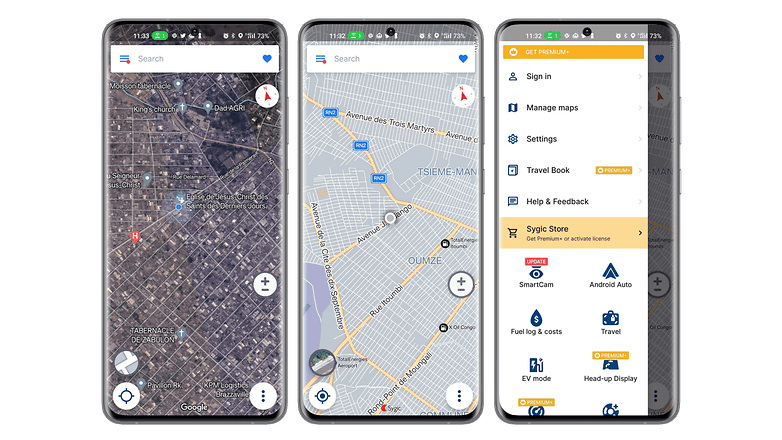
Ladet Sygic jetzt aus dem Google Play Store herunter.
Die Alternative zur besten Navigations-/GPS-App: Mappy
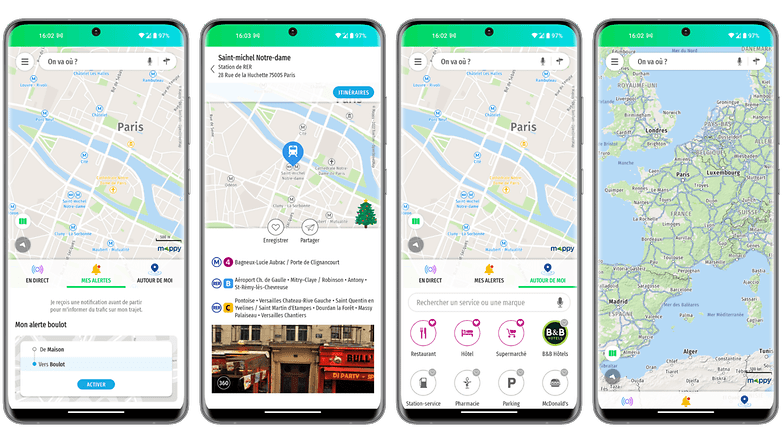
Mappy setzt auf die Vielfalt der von ihr unterstützten Verkehrsmittel. Die App ermöglicht es Euch, Eure Routen zu planen, indem sie alle Verkehrsmittel wie Auto, öffentliche Verkehrsmittel, Taxi, Flugzeug, Uber, Zug, BlaBlaCar, Fahrrad, Fahrradverleih und sogar Elektroroller sowie Fußwege miteinander vergleicht.
So könnt Ihr Eure Reisen planen, indem Ihr auf alle Verkehrsdaten in Echtzeit zugreift. Die Karten sind auch ohne Internetverbindung zugänglich, und die App ermöglicht es Euch auch, die Kosten für Eure Reise zu berechnen und Sehenswürdigkeiten zu finden. Mappy hat eine klare Oberfläche, die sich auf das Wesentliche konzentriert.
- Preis: Kostenlos / Werbung: Nein / In-App-Käufe: Nein / Konto: Nicht erforderlich.
Ladet Mappy hier aus dem Google Play Store herunter.
Die beste Wetter-App: Wetter & Radar
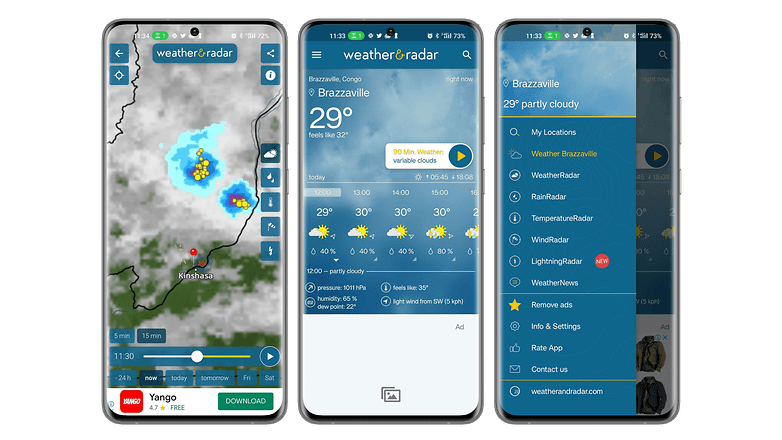
Wetter & Radar ist eine ziemlich umfangreiche Wetter-App, die sich durch ihre Echtzeit-Wettervorhersage auszeichnet. Die App bietet Euch zuverlässige stündliche und tägliche Vorhersagen mit einem Echtzeit-Radar inklusive Wetteranimation. Ihr bekommt auch Infos wie Unwetterwarnungen bei gefährlichen Wetterphänomenen, das Schneewetter, die Wassertemperatur am Meer oder den UV-Index.
Die App verfügt auch über einen Pollenanzeiger, der die Pollenvorhersage für allergene Pflanzen anzeigt. Eine weitere Stärke von Wetter & Radar sind die gut durchdachten Widgets, die sehr praktisch sind, um Euch schnell zu informieren, ohne in die App gehen zu müssen. Trotz der Fülle an Informationen ist die Benutzeroberfläche übersichtlich und die Elemente sind gut angeordnet.
- Preis: Kostenlos / Werbung: Ja / In-App-Käufe: Ja / Konto: Nicht erforderlich.
Lade Wetter & Radar aus dem Google Play Store herunter.
Die Alternative zur besten Wetter-App: Meteociel
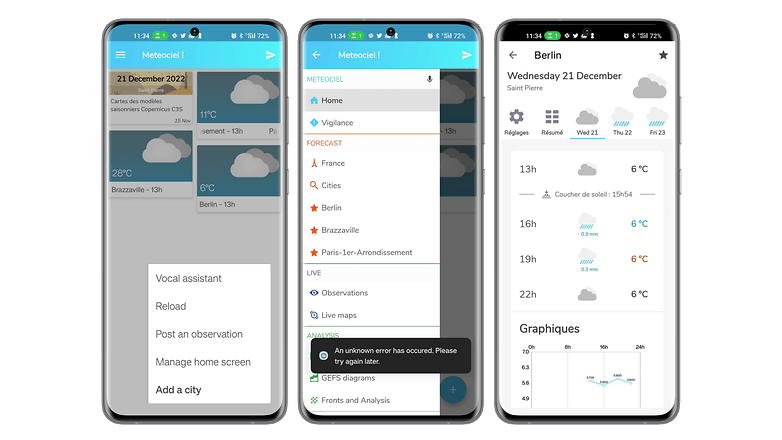
Meteociel ist eine sehr umfassende und einfach zu verstehende Wetter-App. Auf der Startseite werden die Trends der Städte, die Ihr zu Euren Favoriten hinzugefügt habt, und ihre Live-Temperaturkarten hervorgehoben. Die App zeigt einen detaillierten Wetterbericht mit Luftdruck, Bewölkung, Luftfeuchtigkeit, durchschnittlicher Windgeschwindigkeit, Windböen und Windrichtung an.
Ihr könnt auch verschiedene Live-Karten ansehen, auf die offiziellen Messungen der verschiedenen Wetterstationen zugreifen, die in den letzten Jahren durchgeführt wurden. Die dunkle Benutzeroberfläche ist angenehm und intuitiv zu bedienen.
Leider ist die App Stand jetzt noch nicht auf Deutsch erhältlich, aber aufgrund des tollen Funktionsumfangs und unseren begeisterten französischen Kollegen von nextpit.fr haben wir die App an dieser Stelle dennoch in die Liste unserer Empfehlungen übernommen.
- Preis: Kostenlos / Werbung: Nein / In-App-Käufe: Nein / Konto: Nicht erforderlich.
Ladet Meteociel hier aus dem Google Play Store herunter.
- Weiterlesen: Die besten Wetter-Apps für Android
Die beste App für Lesen, Hörbücher und Podcasts: Kobo
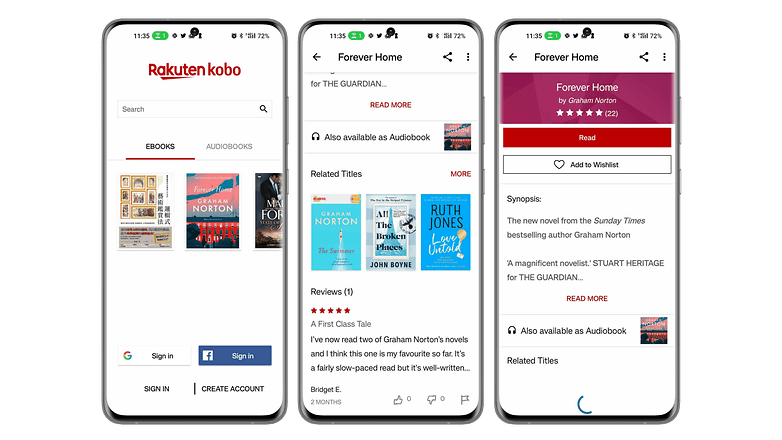
Mit Kobo Books könnt Ihr auf Eurem Smartphone bequem Eure eBooks lesen und Eure Hörbücher anhören. Die App hat eine Sammlung von über 100.000 eBooks und Hörbüchern aus den verschiedensten Bereichen und Genres. Ihr musst nur einen Titel auf Kobo.com kaufen, bevor Ihr Eure App synchronisiert und schon könnt Ihr ihn jederzeit lesen oder anhören.
Ihr könnt Eure Lektüre auf einem Gerät beginnen und auf einem anderen beenden, da alle Eure Lesezeichen synchronisiert werden. Kobo bietet auch kostenlose Leseproben an, um Euch bei der Auswahl eines Buches zu helfen. Das Leseerlebnis wird durch Funktionen wie die Wahl zwischen Tag- und Nachtmodus, die Schriftgröße und sogar die Möglichkeit, mit dem integrierten Wörterbuch nach Wörtern zu suchen, verbessert.
- Preis: Kostenlos / Werbung: Nein / In-App-Käufe: Ja / Konto: Erforderlich.
Kobo aus dem Google Play Store herunterladen
Die Alternative zu den besten Lese-/Hörbuch-/Podcast-Apps: Podcast Addict
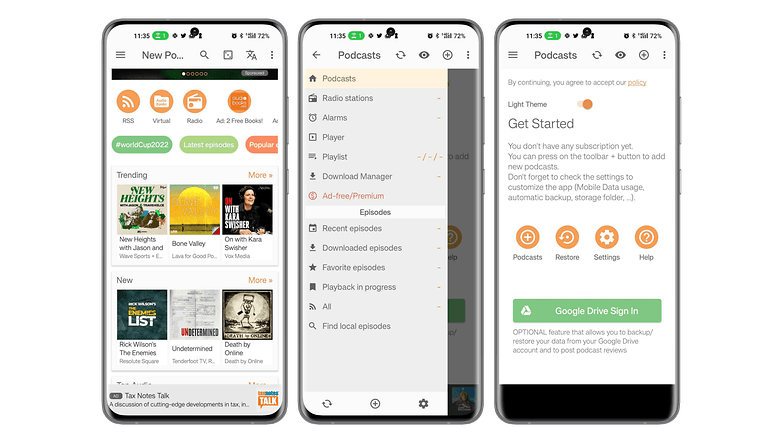
Podcast Addict ist eine App, die Podcasts aus verschiedenen Quellen zentral sammelt. Ihr könnt die fünf Millionen Podcasts und über 100 Millionen Episoden nach Namen oder Schlüsselwörtern durchsuchen. Podcast Addict bietet auch Zugang zu Hörbüchern, Radiosendungen und YouTube- oder Twitch-Kanälen. Ihr könnt mehrere Podcasts abonnieren, Episoden herunterladen und Benachrichtigungen über die neuesten veröffentlichten Audioinhalte erhalten.
Die App ermöglicht neben Deutsch den Zugriff auf Episoden in verschiedenen Sprachen, und der Audioplayer ist vollständig anpassbar. Ihr könnt die Einstellungen je nach Podcast ändern und speichern.
- Preis: Kostenlos / Werbung: Ja / In-App-Käufe: Ja / Konto: Erforderlich.
Ladet Podcast Addict aus dem Google Play Store herunter.
Die beste App für Online-Speicher: pCloud
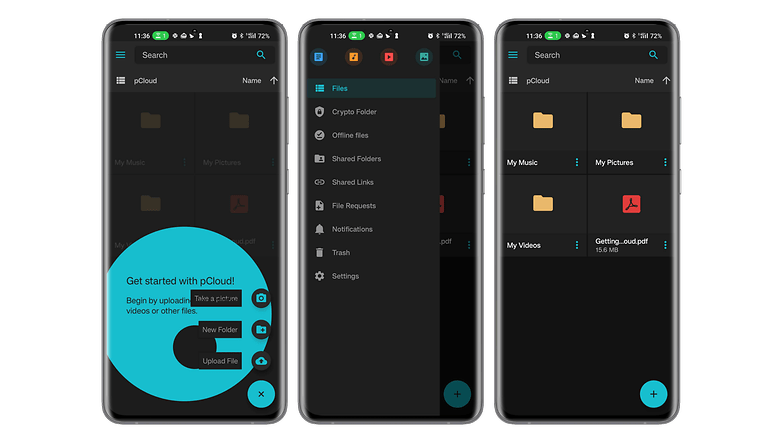
pCloud ist eine Online-Speicher-App mit einem sehr interessanten Angebot. Dank des lebenslangen Speicherplatzangebots nach einer einmaligen Zahlung musst Ihr keine monatlichen Kosten tragen. Die App hat eine einfache Benutzeroberfläche und bietet die vollständige Verschlüsselung Eurer Daten für die Übertragung und Speicherung sowie die Synchronisierung Eurer auf allen Euren Geräten gespeicherten Dokumente.
- Weiterlesen: pCloud im Test von nextpit
Ihr könnt alle Eure Dateien herunterladen, verschieben, umbenennen und direkt aus der App auch ansehen oder anhören – egal ob Ihr ein Smartphone, einen PC, Mac oder sogar Linux habt. In unserem nextpit-Test hat der Dienst von pCloud 4 von 5 Sternen erhalten.
- Preis: Kostenlos / Werbung: Nein / In-App-Käufe: Nein / Konto: Erforderlich.
Ladet pCloud aus dem Google Play Store herunter.
Die Alternative zur besten App für Online-Speicher: Mega
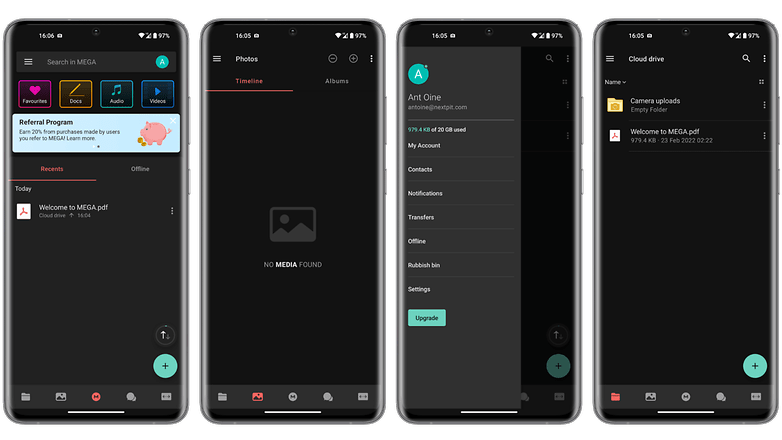
Mit Mega könnt Ihr kostenlos bis zu 20 GB an Daten speichern. Dank der Synchronisierung könnt Ihr auf jedem Gerät auf Eure Dateien zugreifen. Ihr könnt den Zugriff auf Eure Daten mit einem Passwort schützen. Die Anwendung fördert die gemeinsame Nutzung von Dateien mit ihrem gemeinsamen Ordner, ermöglicht aber auch die Übertragung von großen Dateien, indem Ihr sie hochladet und dann nur den erzeugten Link teilt.
Mit Mega habt Ihr einfachen Zugang zu Statistiken über die Nutzung Eures Cloud-Speichers, könnt Inhalte per Drag & Drop direkt auf die Weboberfläche ziehen, Dokumente in der Vorschau ansehen und sogar Videos über einen integrierten Player abspielen.
- Preis: Kostenlos / Werbung: Nein / In-App-Käufe: Nein / Konto: Erforderlich.
Ladet Mega hier aus dem Google Play Store herunter.
Die beste Dating-App: Once
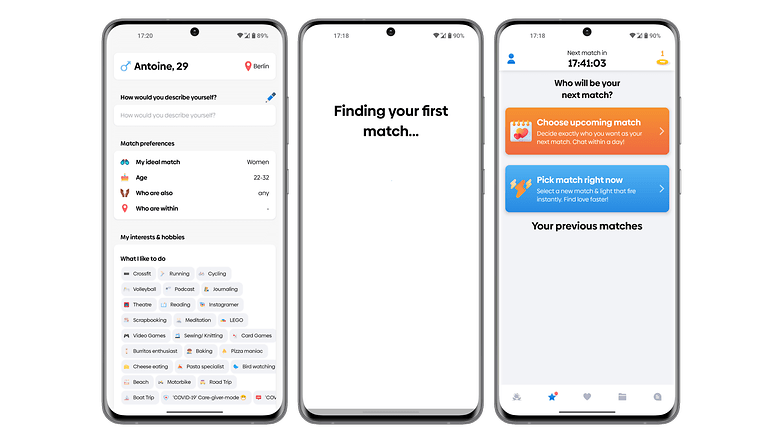
Once ist eine Dating-App für alle, die sich Zeit für lohnenswerte Begegnungen nehmen wollen. Das Besondere an dieser App ist, dass sie nur ein Profil pro Tag anzeigt. Im Laufe der Zeit werden die Algorithmen immer besser, um Euch immer passendere Partner zu empfehlen.
Once konzentriert sich auf Begegnungen, die zu einer ernsthaften Beziehung führen können. Die Personalisierung Eures Profils verbessert Eure Chancen, genau den richtigen Partner zu finden. Die Benutzeroberfläche der Anwendung ist etwas überladen, vor allem mit der Bewertungsfunktion.
- Preis: Kostenlos / Werbung: Nein / In-App-Käufe: Ja / Konto: Erforderlich.
Ladet Once hier aus dem Google Play Store herunter.
Die Alternative zur besten Dating-App: Bumble
Bumble hat die gleichen Grundfunktionen wie die meisten Dating-Apps, ergänzt sie aber um praktische Funktionen wie Freundschafts- und Geschäftskontakte. Anders als z. B. Tinder gibt Bumble den Frauen die Initiative beim Dating und verbietet es Männern, den ersten Kontakt herzustellen.
Neben der gelungenen Chatfunktion könnt Ihr Sprachnachrichten verschicken, ein Mini-Frage-Antwort-Spiel zum Kennenlernen spielen, Fotos verschicken und einen Videoanruf starten.
- Preis: Kostenlos / Werbung: Nein / In-App-Käufe: Ja / Konto: Erforderlich.
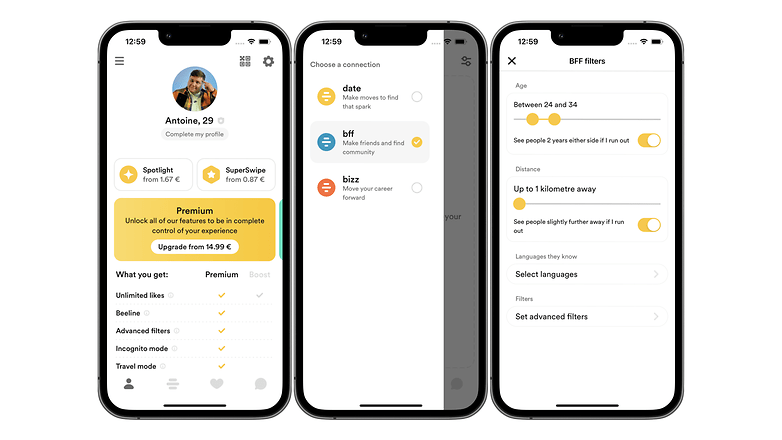
Ladet Bumble hier aus dem Google Play Store herunter.
- Weiterlesen: Die besten Dating-Apps für Android
Das war's mit unserer Auswahl der besten Android-Apps, die Ihr auf Eurem Smartphone im Jahr 2024 installieren solltet. Was sind Eure liebsten Android-Apps? Habt Ihr noch weitere Vorschläge?
Der Artikel über die besten Android-Apps wurde im Januar 2024 aktualisiert. Bestehende Kommentare blieben erhalten und können daher aus dem Zusammenhang gerissen wirken.





Die beste Foto-App
- ProCam X und PhotoPills
Die beste App zur Fotobearbeitung
- PhotoRoom
Die beste Produktivitäts-App
- Meiner Meinung nach erreicht man mit den Fokussierungs-Apps genau das Gegenteil. Eine weitere App, auf die man seine Konzentration richtet. Ich würde hier eher einen Launcher wie Minimalist empfehlen, der den Fokus tatsächlich auf das Wesentliche richtet. Wenn man das denn wünscht.
Die beste Mail-App
- gMail kann das Gleiche und ist auch nicht auf Google Mailadressen beschränkt. Ich verstehe den Mehrwert nicht. Das einzige, was mich an Gmail immer störte waren die Labels und die Art und Weise, wie schlecht diese in die mobile App integriert sind. Würde da harte und vor allem erstellbare Kategorien bevorzugen.
Die beste Fitness-App
- keine Präferenz. Gibt viele tolle Fitness-Apps. Workout zuhause finde ich besonders toll.
Die beste App für Notizen
- WeNote und D Notes sind meine Favoriten. Besonders bei D Notes sind die vielfältigen Anpassungsmöglichkeiten, Kategorien, Durchsuchbarkeit, Sperre von Notizen und die verschiedenen Notiz-Arten einfach nur hervorragend.
Die beste Navigations-/GPS-App
- Meiner Meinung nach sind beide Vorschläge nichts. Waze macht Bock als Community-Navigation, Here ist nach wie vor extraklasse und ansonsten macht kaum eine App mehr für wenig Spritverbrauch und wenig CO2 Abdruck als Google Maps
Die beste Wetter-App
- Auch hier absolut anderer Meinung. YoWindow gibt es so oft bei App4Sales für lau, dass die inzwischen jeder haben sollte. Bietet zudem eine Live-Vorhersage in einem tollen Design und einen Live-Hintergrund mit Wettereffekten. Ansonsten ist in Deutschland WeatherPro die Qual der Wahl, da leider nicht ganz billig.
Die beste App zum Abspielen/Audiobooks/Podcasts
- Podcast Republic ist für mich das NonPlus Ultra. Kobo werde ich allerdings mal testen, auch wenn Rakuten hierzulande... naja... nicht so viel Vertrauen erweckt.
Die beste App für Online-Speicher
- Mal abgesehen davon, dass nichts besser ist, als eNextCloud oder eine eigene Cloud per NAS (für weniger Geld und mit mindestens 4 mal so viel Speicher), finde ich 400 Euro für lebenslange 2 TB echt nicht günstig. Zumal mir Webspeicherplatz trotz monatlicher Kosten auch noch einen anderen Mehrwert bringen kann und die Daten zu Hause sicherer sind als auf einem x-beliebigen Server.
Die beste Dating-App
- Beide Vorschläge sind massiv Fake-verseucht. Solche Fakes mag es auch auf anderen Plattformen geben, viele Plattformen geben sogar in ihren AGB an, dass sie Agents beschäftigen, um mit Mitgliedern zu kommunizieren (und Mitgliedschafts- und Nachrichten-Pakete zu verkaufen), aber seriös sind scheinbar echt nur die Großen wie Parship. ElitePartner, LoveScout und Co. Bei Bumble hat man als nicht Schönling halt die Arschkarte. Und Once... naja, den selben Effekt erreicht man, wenn man jeden Tag ins selbe Cafe geht.
VLC für Windows ist der ultimative Player. VLC für Android ist bisher (und immernoch) unsäglich. Bei jedem Start liest der 20 min die Bibliothek ein. Allein das ist ein "Nein Danke!".
Das passiert bei mir nicht. Einlesen ist in unter 10 Sekunden abgeschlossen.
Für Mails bevorzuge ich AquaMail. Und als WhatsApp Ersatz WhatsApp Plus
Wo finde ich meine alten Computerbild Apps? 2 meiner Premium Apps von Computerbild sind nach Android 10 Update nicht mehr da und ich möchte sie gern wieder installieren.
Allein, dass Wish "empfohlen" wird, macht den ganzen Artikel unseriös... Wer da kauft, ist selbst schuld. Abzocke und Betrug am laufenden Band.
Accuweather hat bei mir noch nie etwas angezeigt, das der Realität entsprach.
Woran liegt's? Zeit des immer das Wetter von woanders an? Ich hab die App auch und die ist soweit aktuell. Hat gestern für heute früh Regen vorraus gesagt gegen halb 9 und so ist es auch aktuell...
Keine Ahnung, habe die App nach kurzer Zeit wieder deinstalliert. Wetter.com erscheint mir um Längen besser.
Anstatt solche Listen mit den üblichen Verdächtigen zu wiederholen, macht doch mal n Artikel über hervorragende Apps, die einfach mal so aus dem Store verschwunden sind. Als Beispiel nenne ich mal Llama und den Boat Browser.
Da könntet ihr mal recherchieren.
Die beste Mail App ist und bleibt für mich Spark.
Warum erwähnt ihr nie die DB Regio App?🤔
Mmh...Bei den Dateiexplorern vermisse ich die Erwähnung von x-plore, bei den Browsern Sleipnir. Und als Navi empfehle ich Osmand. Bei n Tastaturen könnte noch Swype erwähnt werden. allerdings wird die App nicht mehr weiterentwickelt, was extrem schade ist. Die Funktionalität dieser vier Apps ist so was von gut...und sie werden selten in den gängigen Foren erwähnt. Ich frage mich wie es sein kann, dass die Redaktion die Apps nicht kennt...
Zudem haben viele der genannten Apps Tracker integriert...ob eine App solche enthält, lässt sich auf der Seite Exodus prüfen....
Die Beste Tastatur ist die auf SWIFT key basierende Samsung Tastatur und die neue Samsung neural Tastatur.
K9 email kann ich zustimmen gmail überhaupt nicht wegen den agb.
Den vlc kann man wohl derzeit nicht empfehlen, er hat eine kritische Sicherheitslücke (CERT) und die Macher haben noch keinen Fix in Aussicht gestellt!
Also ich nutze jetzt MixPlorer hat bei mir ES Explorer abgelöst. Bei Google Maps fehlt mir die Funktion dieses Teilstück umfahren. Wenn ich weiß da ist eine Baustelle wo google lang fahren will wäre es super wenn man das Google Maps sagen könnte. Als ich das letzte mal Here Maps genutzt habe ging es da auch nicht. Bisher nur noch TOMTOM mit dieser Funktion. Kostet aber ja 29€ im Jahr.
Wenn man Routen manuell, z. B. am PC, erstellt kann man schon Teilstücke umfahren, das geht recht einfach mit der Maus über den Routenplaner. Nach Eingabe von Start und Ziel, kann man mit der Maus die Route manipulieren. Ist die gewünschte Streckenführung erstellt, kann man die Route an das Smartphone 'schicken' (Wegbeschreibung auf mein Smartphone senden). Ich nutze das seit ein paar Wochen im Großraum Hamburg, die Behörden / Planer haben sich entschieden fast alle Elbquerungen (A1, A7, B75) gleichzeitig zu bebauen. Bei der A7 geht die Geschichte wohl noch etwa 10 Jahre, was ich so gelesen hab, dann muss die Süderelbbrücke komplett erneuert und mit 4 Spuren pro Richtung ausgebaut werden (Zeitdauer unbekannt). Ich muss mir derzeit sogar für Hin- und Rückweg unterschiedliche Routen erstellen, das geht also mit Maps recht gut.
Meine Tochter wohnt nördlich von Hamburg, eine Navi, mit der man rel. komfortabel Routen erstellen kann, ist für mich also unerlässlich.
Blue Mail läuft hervorragend, Dateimanager +, VLC Player sowieso und Business Calendar.
Wetter Apps? Platzverschwendung.......
Spark für E-Mail, Newsfold für RSS, Tusky für Mastodon
Solch eine Liste ist ja gar nicht mal so einfach finde ich.
DB Regio App habt ihr vergessen.