Produktiv sein am Smartphone? Diese Apps machen es möglich!

Spielekonsole, E-Book-Reader, Wetterzentrale - ein Smartphone kann so vieles sein, aber vor allem ist es auch ein unverzichtbares Instrument für die Arbeit und die richtige Organisation von Beruf und Alltag. Wir stellen Euch Produktivitäts-Apps vor, die man ausprobieren sollte.
Direkt zur App springen:
- Any.do: To-do-Liste, Kalender & Erinnerungen
- Google Drive + Docs, Tabellen, Präsentationen
- Business Kalender 2
- Trello
- Tiny Scanner - PDF Scanner
Any.do: To-do-Liste, Kalender & Erinnerungen
Die App Any.do kombiniert eine To-Do-Liste, mit einem übersichtlichen Kalender und Erinnerungen, die selbst die Vergesslichsten unter Euch regelmäßig darauf hinweist, was es noch alles zu tun gibt. Das alles wird nahtlos zwischen Smartphone, Desktop-PC, Browser-App und Tablet synchronisiert, sodass Ihr auf jedem Gerät im Haushalt auf dem aktuellen Stand seid.
Darüber hinaus könnt Ihr Erinnerungen erstellen, eine Einkaufsliste mit Freunden oder Familie teilen oder Eure Gedanken schriftlich festhalten. Lasst Termine automatisch in den Kalender eintragen, Euch auf dem Weg nach Hause daran erinnern, dass Ihr noch etwas bestimmtes erledigen wolltet und heftet Dateien von Eurem Computer, aus der Dropbox oder Google Drive an die Aufgaben an.
${app-com.anydo}Google Drive + Docs, Tabellen, Präsentationen
Muss man zu Google Drive noch etwas sagen? Für Android-Nutzer ist es die App der Stunde, wenn es um das Verwalten von Dateien in der Cloud geht, egal ob es sich um Fotos, Dokumente, oder Videos handelt. Google Drive ist der sichere Hafen für alle Online-Dokumente, der Zugriff gelingt über die App genauso wie plattformübergreifend über den Browser.
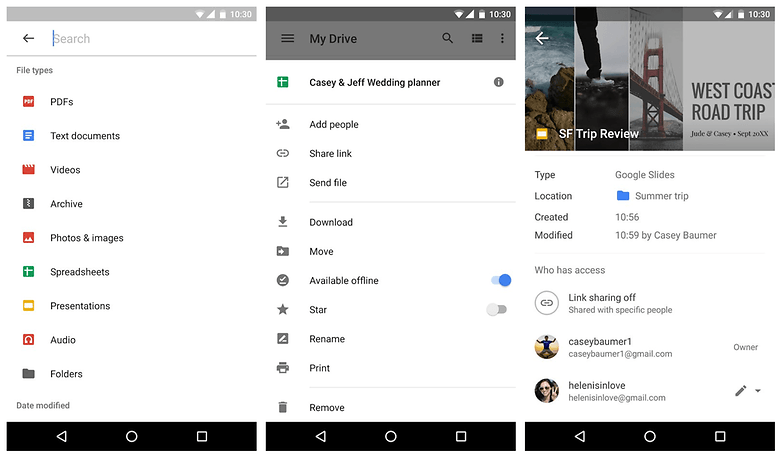
Außerdem könnt Ihr Dokumente problemlos mit den anderen anderen Nutzern der Google-Office-Apps wie Google Docs, Google Tabellen und Google Präsentationen teilen. Die Office-Anwendungen verfügen auch über genügend Einstellungsoptionen, um Änderungen an Dokumenten oder Präsentationen vorzunehmen.
${app-com.google.android.apps.docs}${app-com.google.android.apps.docs.editors.docs}${app-com.google.android.apps.docs.editors.sheets}${app-com.google.android.apps.docs.editors.slides}Business Kalender 2: Der Terminkalender für ganz geschäftige
Android-Nutzer werden zwangsläufig den Google-Kalender nutzen, um ihre Termine zu verwalten, aber der ist funktional immer noch nicht das Gelbe vom Ei. Eine gelungene Erweiterung ist der Business Kalender 2. Eine Aufzählung der Funktionen würde den Rahmen hier sprengen.
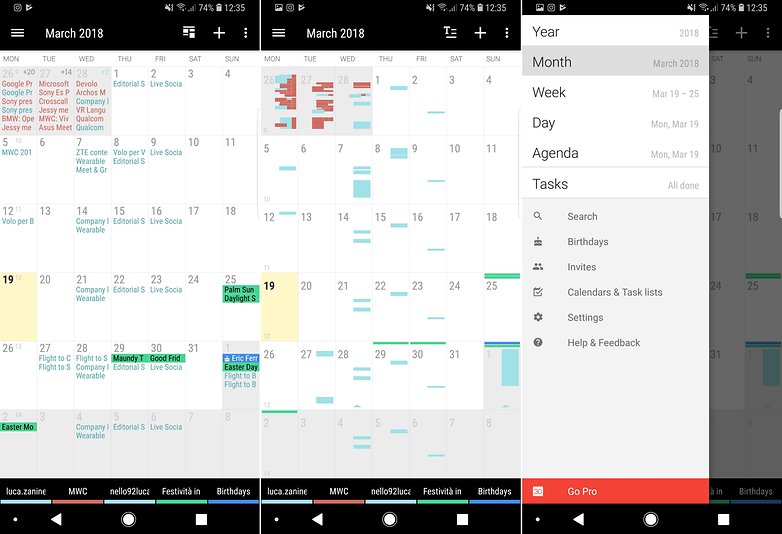
Nur soviel sei gesagt: Drag and Drop sowie Mehrfachauswahl erlauben das schnelle Bearbeiten von Terminen, und mithilfe von Vorlagen sind verschiedene Terminarten im Handumdrehen erstellt. Uns überzeugt die Kalender-App auf ganzer Linie, aber natürlich gibt es noch viele andere - eine kleine Übersicht bietet unsere Kalender-Auswahl.
${app-com.appgenix.bizcal}Trello: Projektmanagement leicht gemacht
Trello ist eine Mischung aus To-Do-Liste und Projekt-Manager. Die App ermöglicht es Euch, mehrere Projekte und Aufgaben im Auge zu behalten, ohne unter der Informationsflut zusammenzubrechen. Wenn Ihr verschiedene Projekte gleichzeitig von Eurem Smartphone oder Tablet aus checken und managen wollt, dann ist Trello eine der besten Möglichkeiten dafür.
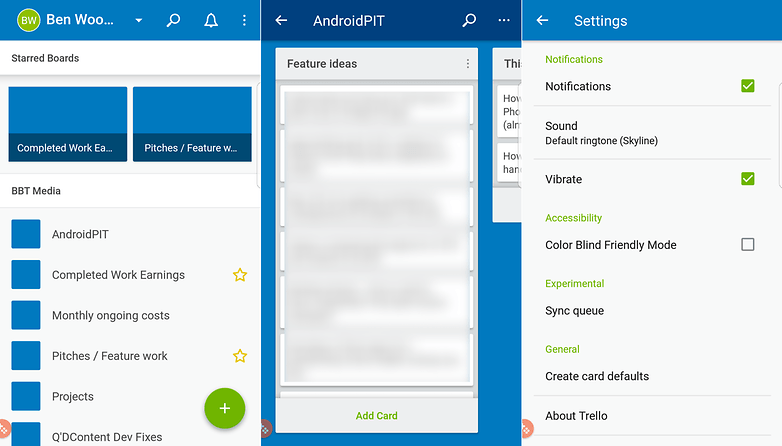
Das Organisationssystem basiert im Kanban-Stil auf Karten und jede dieser Karten kann Mitglieder, Etiketten, Daten und andere Informationen enthalten. Jeder Befugte kann sie einsehen, anpassen, verschieben, sodass in einem Fluss von mehreren Nutzern an einem Projekt gearbeitet werden kann. Das alles wird über die Cloud synchronisiert, sodass Ihr sowohl über das Internet als auch über Eure mobilen Geräte auf das Trello-Konto zugreifen könnt.
${app-com.trello}Tiny Scanner - PDF Scanner
Nun habt Ihr all diese Apps, aber immer noch einen Haufen Papier auf Eurem Schreibtisch liegen? Dann wird es Zeit, diese zu digitalisieren. Ein hervorragendes Tool, auf dem Weg zum Papierlosen Büro, ist Tiny Scanner. Hiermit könnt Ihr Dokumente einscannen, die automatisch zugeschnitten, verbessert und an Eurem Wunschort gespeichert werden.
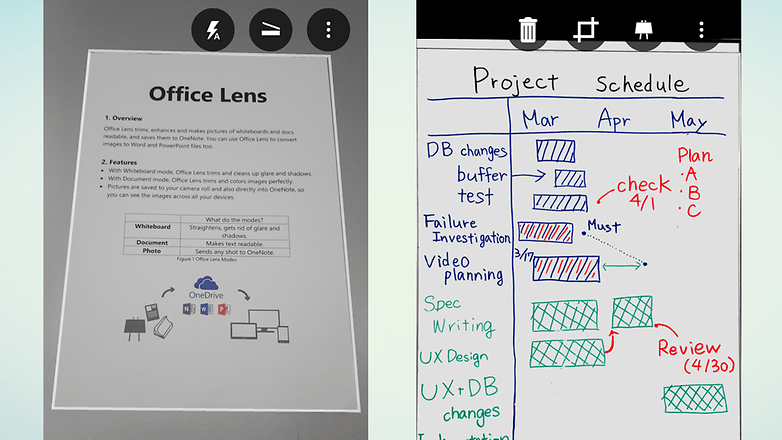
Klar bietet beispielsweise auch Google Drive eine Scan-Funktion, doch die ist etwas rudimentär und bietet daher weniger Funktionen, als Tiny Scanner. Die App ist kostenlos, aber es gibt eine Pro-Version, mit der Ihr Scans direkt zu einem Cloud-Speicherdienst hochladen könnt.
Das waren nur fünf aus unzähligen Produktivitäts-Apps aus dem Google Play Store. Welche nutzt Ihr? Schreibt uns Eure Empfehlungen in die Kommentare!




Als erstes alle unnötigen Apps deinstallieren und dazu habe ich auf dem auf dem Homebildschirm mein "Memo-App" und mein "Kalender-App". Diese beiden sind von Samsung bei S7 noch sehr gut schlicht und einfach gehalten. Jedoch sind die neueren Generationen nicht toll. Aber Produktivität ist mir schon ein wichtiges Thema, wie es in der Zukunft sein soll, wenn nur noch fancy-apps dazu kommen und der Smartphone selber nicht mehr Produktiv ist.
Smartphone ersetzt noch lange keinen richtigen PC oder Spielekonsole. Aber sonst gute Auswahl an Apps. Für Fotos mal schnell zu bearbeiten, reicht ein Smartphone.
Der Gedanke eine App für Aufgaben, Erledigungen etc. zu nutzen ist löblich. Die Sache hat für mich einen großen Haken, die App muss mit Informationen gefüttert und gepflegt werden - das ist mir zu nervig. Außerdem vergesse ich immer erledigte Sachen zu dokumentieren
Produktiv sein am Smartphone wird einem leider nicht wirklich leicht gemacht. Die Apps sind seit Jahren immer die gleichen und eine wirkliche Entwicklung findet nicht statt. Hier hätten die Hersteller echt großen Nachholbedarf, allerdings fürchte ich, dieser Zug ist längst abgefahren. Enttäuschend.
Man kann auch mit 'nem Hammer produktiv sein, obwohl der seit Jahrhunderten kaum noch weiterentwickelt wurde.
Das Tool muss seinen Zweck erfüllen. Regelmäßige Verschlimmbesserung machens nicht zwangsläufig besser und können da auch kontraproduktiv sein.
Genau. Das Tool muss seinen Zweck erfüllen. Und das tun die meisten Apps nicht im Entferntesten. Ich rede nicht von Verschlimmbesserungen, ich rede von Nutzungsreife.
Achso ... das las sich für mich erst so, als könne man nur produktiv sein, wenn ständig neue Funktionen dazu kämen.
Wobei ich jetzt für mein Teil nicht sagen kann, dass die Apps nicht ihren Zweck erfüllen würden. Allerdings nutze ich das Smartphone auch eher als Organisationstool für die Arbeit und weniger als Arbeitsgerät selbst. Dafür ist mir einfach das Format zu unpraktisch.
Kannst auch dein Smartphone als Hammer benutzen oder um ne Fliesenfuge zu verschmieren 💪😎🤳. More Power...
„Das glaube ich nicht, Tim!“
Wir können ja den Xpert-Timer Mobil für Android empfehlen. Da kann man ganz einfach und genau festhalten wie lange man an was arbeitet... und Auswertungen können als PDF gedruckt oder exportiert werden. Will hier nicht zu ausschweifend werden... die App hat echt viele nützliche Funktionen. www.xperttimermobil.de
Ich verstehe den Zusammenhang zwischen Wunderlist, Inbox, und der Gruppierung "Reisen" nicht. Ich benutze Wundelist nicht und habe es auch nie installiert. Trotzdem habe ich in der Inbox eine Gruppe Reisen.
<ironie> Wie geht das? Hat mich jemand gehackt und mir gegen meinen Willen Wunderlist untergeschoben? Skandal! </ironie>
Vielleicht sollte der geschätzte Autor den Artikel noch mal diesbezüglich prüfen
Sparen wir wirklich Zeit ?
Nein. Es ist nur eine alternative Form zum Vorgänger.
Und wenn ich Lese dass manche User 4 Stunden Display on haben.... dann sind mindestens 3,5 std verloren 😷 die man davor frei hatte 🤔 oder was sinnvolles macht.
Betrifft auch mich. Wenn auch nicht in einem Außmaß wie manch andere
Ich muss zugeben das es bei mir früher keine Seltenheit war, dass mein Display 6-8h am Tag an war. Aber wertvolle Zeit "spart" man nur wenn man das Smartphone weniger benutzt.
bei feedly fehlt download link
Da fehlt auf jeden Fall Any.do ;) Meine Lieblingsapp unter den to-do Listen, weil sie minimalistisch und einfach ist
Ich brauche für Inbox eine Einladung, um es nutzen zu können -.-'
Braucht jeder du Schlaumeier -.-
Eure Office Hinweise sind zumidest für mein Tablet falsch. Ich habe 4.2
Ich hab echt versucht mit inbox zu arbeiten, nachdem es so gehypet wurde. Das war Chaos pur, denn ich habe später nix wiedergefunden. Es geht einfach nichts über eine gut organisiertes händisches Sortier- und Ordnungssystem, das ist weniger Arbeit, als bei inbox nach 15 Mails zu einem bestimmten Thema zu suchen.
Jiffy nutze ich auch. Seit dem merke ich wieviele Überstunden ich tatsächlich mache ;/
Wieso das denn?
Die ersten 3-4 Tage kommen viele alte Mails an, weil er die alle lädt und einsortiert, aber danach ist die App richtig gut.
Durch die eigenen Kategorien auch sehr übersichtlich.
Und zum suchen zu einem bestimmten Thema.. Einfach oben bei Suche eingeben?!
Nichts ist leichter als das.